5 Time-Saving Content Workflows for Busy Freelance Content Creators
5 Time-Saving Content Workflows for Busy Freelance Content Creators
How I cut my content creation time in half (and you can too)
Here's what I learned after three years of struggling to maintain a blog while juggling client work: The problem isn't time. It's decision fatigue.
Every time you sit down to write, you're making dozens of micro-decisions. What should I write about? How should I start? What's the best way to explain this? By the time you've figured out your topic, you're already mentally drained.
The solution? Build workflows that eliminate most of these decisions before you sit down to write.
I tracked my time for a month and found that workflows cut my blogging time from 4 hours per post to about 90 minutes. The 2023 Content Marketing Institute study backs this up—freelancers with documented systems publish three times more consistently than those winging it every time.
Why most freelancers fail at content marketing
It's not a motivation problem. It's a systems problem.
Client work comes first because it pays immediately. Content marketing pays later, maybe, if you do it right. So when deadlines hit, the blog gets pushed to "when I have time." Which is never.
Upwork's 2023 survey found that 67% of freelancers blame inconsistent schedules for their content marketing failures. But I think that's backward. Inconsistent content creates inconsistent business, not the other way around.
5 Proven Content Workflows for Freelance Content Creators
Workflow 1: The Strategic Batching Method
Most people batch wrong. They try to write three blog posts in one day and burn out by lunch.
Instead, batch by task type:
Month 1, First Monday (2 hours):
- Open Ahrefs or your keyword tool
- List 8-12 topics your audience actually searches for
- Don't overthink it—if it has search volume and matches your expertise, add it
Every other Tuesday (45 minutes):
- Pick 3-4 topics from your list
- Write a quick outline for each (5-7 bullet points max)
- Note any research you'll need
Thursday mornings (90 minutes each):
- Pick one outline
- Write the first draft start to finish
- Don't edit. Don't fact-check mid-sentence. Just write.
Friday afternoons (30 minutes per post):
- Edit yesterday's draft
- Add links and optimize for SEO
- Schedule it

I started this system in January. By March, I had 12 posts scheduled and my Sunday panic sessions were history.
Workflow 2: Template-Driven Content Creation
Templates aren't cheating. They're professional efficiency.
After analyzing my 50 most-read posts, I found that 80% followed one of four structures:
- The Problem-Solution Post: Problem intro → Why it matters → 3-5 solutions → Implementation steps
- The List Post: Hook → Why this matters → Numbered list with examples → Next steps
- The Case Study: What happened → What we learned → How to apply it
- The Comparison: Option A vs Option B → Pros and cons → Which to choose when
I keep these templates in Notion with sample intros, transitions, and CTAs. When I need to write, I pick a template and fill in the blanks. Cuts planning time from 30 minutes to 5.
Workflow 3: Strategic Content Automation
I use AI for first drafts, then rewrite everything in my voice.
My process:
- Feed ChatGPT my outline and ask for a 1,200-word first draft
- Read it once, then close the tab
- Rewrite from memory, keeping only the research and structure
This gives me the benefits of AI speed without the robotic tone. The AI draft gets me past the blank page problem. My rewrite ensures it sounds like me.
For publishing, I use Buffer to schedule social posts and ConvertKit for email sequences. But I still manually review everything before it goes out.
Workflow 4: The Content Repurposing Engine
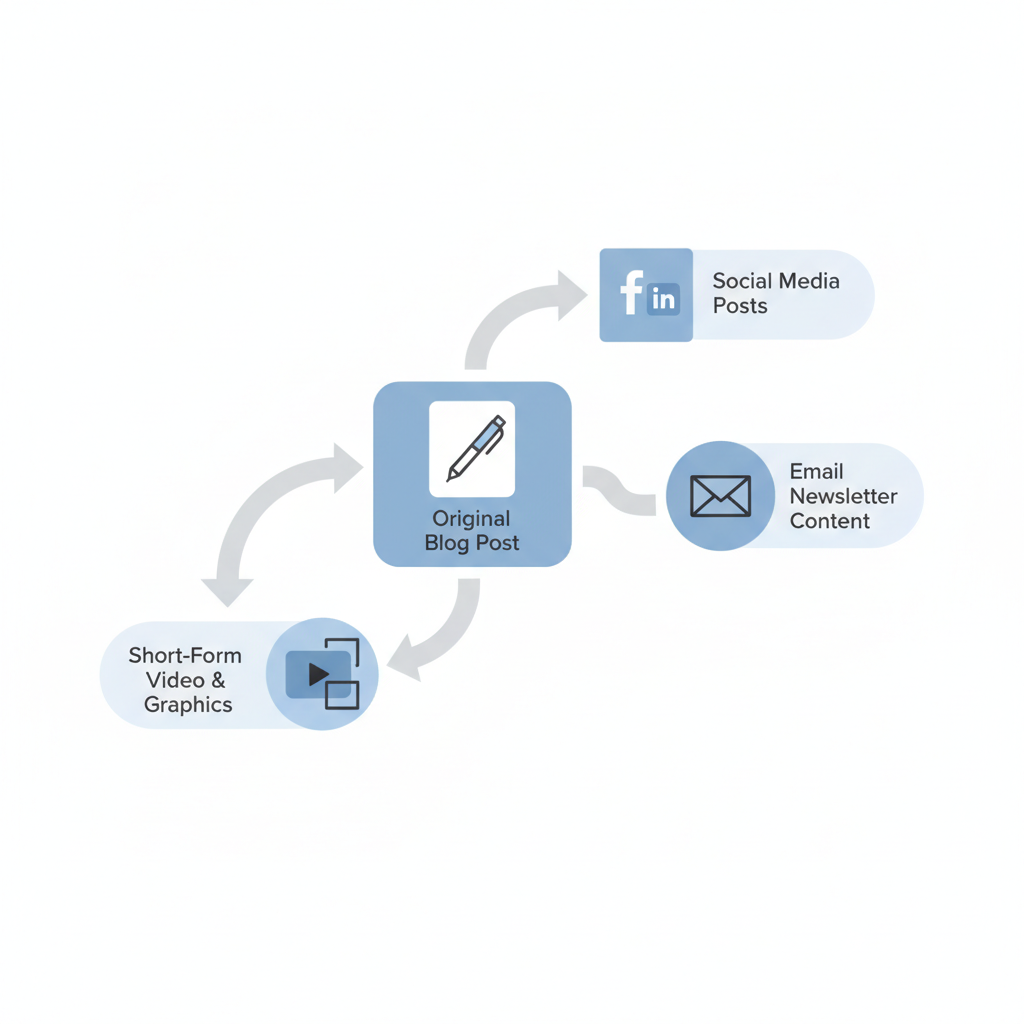
One good blog post can become:
- 4-5 Twitter threads
- A LinkedIn article (shorter version)
- An email newsletter
- 3-4 Instagram carousel posts
- A YouTube video script
I write the blog post first, then extract the best insights for other formats. A 1,500-word post about productivity tips becomes a Twitter thread about the top 3 tips, a LinkedIn post about why productivity advice fails, and an email series diving deeper into each tip.
Tools like Repurpose.io can automate some of this, but I prefer doing it manually. Takes 20 minutes and lets me tailor each piece to its platform.
Workflow 5: The Minimum Viable Publishing Strategy
For perfectionists who never publish because it's "not good enough yet."
Rules:
- One post every two weeks, no exceptions
- 800-1,200 words maximum
- Good enough beats perfect
- Publish on the same day every time
I have a client who spent six months "almost ready" to launch her blog. We implemented this system and she published her first post the next Tuesday. It wasn't her best work, but it was published. Three months later, that "imperfect" post had generated two new clients.
Choosing the Right Workflow for Your Freelance Business

| Workflow | Best For | Key Requirement | Recommended Tools |
|---|---|---|---|
| Batching | People with predictable schedules | 2-hour blocks twice a month | Google Calendar, Toggl |
| Templates | Writers who create similar content | Analyzing what already works | Notion, Google Docs |
| Automation | Anyone scaling beyond 20 hours/week | Upfront tool investment | Claude, Buffer, ConvertKit |
| Repurposing | Active on multiple channels | Existing content library | Repurpose.io, Canva |
| Minimum Viable | Chronic perfectionists | Letting go of "perfect" | Grammarly, Hemingway Editor |
Pick the one that solves your biggest problem. If you never know what to write about, start with batching. If you spend too much time formatting, try templates. If you're drowning in client work, test automation.
Implementation Roadmap
This week:
- Track how long your current process takes (be honest)
- Pick one workflow from above
- Set up the tools you need
- Write your first post using the new system
- Compare your time to last week
Next month:
- Refine the workflow based on what worked
- Add one automation tool
- Create templates for your most common post types
The bottom line
I wasted two years trying to "find time" for content marketing. The solution wasn't finding time—it was systematizing the work so it took less time.
These workflows aren't magic. They're just smart systems that eliminate decision fatigue and leverage the tools we already have.
Pick one. Try it for a month. Adjust what doesn't work. Your blog (and your business) will thank you.
Keywords: content workflow freelancer, save time blogging
Create content like this automatically
Scribe uses AI to generate high-quality blog posts that engage your audience and drive traffic.