Heartbeat Monitoring Explained: How to Catch Silent Job Failures Before They Cost You
16 min read
Loading...

Meta description: Learn how heartbeat monitoring and cron job alerts catch silent failures that traditional uptime checks miss, plus how to set grace periods that work.
Here's the thing about cron jobs: they're champions of failing without a trace. No crash. No error log. No angry red exception. The job that was supposed to run at 2am simply doesn't, and nobody finds out until three weeks later when someone tries to restore a backup that was never actually created.
That's the exact gap heartbeat monitoring was built to close, and it's also why cron job alerts work so differently from the uptime checks you might already be running. Instead of a monitor reaching out to check if your job is behaving, the job itself sends a quick "I'm alive" ping every time it finishes. If that ping doesn't show up within a window you've defined, Moonitor assumes something's wrong and fires off an alert, even though nothing technically broke. No error was thrown. No server crashed. The job just stopped showing up, and that's exactly the kind of failure traditional monitoring tools can't see.
If you're running scheduled jobs, backup scripts, or anything on a cron schedule, this is genuinely one of the most useful monitoring concepts you can learn. Let's get into how heartbeat monitoring actually works.
Think of heartbeat monitoring as a dead man's switch. You've probably seen the film version: a device needs resetting every so often, or something dramatic happens. Same logic here, much less dramatic outcome (hopefully) - instead of a bomb going off, you just get a Slack message.
Here's how it works in practice. You set up a unique monitoring URL in Moonitor for one specific job. Every time that job completes successfully, it sends a ping to that URL, usually with a simple curl request tacked onto the end of your script. Moonitor then starts (or resets) a countdown timer based on how often you expect that job to run. If the next ping arrives on time, the timer resets and nothing happens. If it doesn't arrive within your grace period, Moonitor assumes the job failed, stalled, or never ran at all, and sends you an alert.
A real heartbeat monitoring script might look something like this:
#!/bin/bash
## nightly-backup.sh

pg_dump mydatabase > /backups/mydb-$(date +%F).sql

if [ $? -eq 0 ]; then
  curl -fsS --retry 3 "https://moonitor.io/ping/your-unique-id" > /dev/null
else
  echo "Backup failed, not sending heartbeat" >&2
fi
A few things worth noting: the heartbeat URL should be treated like a secret, not pasted into a public repo, since anyone with it could ping your monitor and mask a real failure. The curl call also checks the exit status of the backup command first, so a failed backup never gets to send a "success" ping. And --retry 3 means a brief network blip on your end doesn't trigger a false alarm either.

Suggested alt text: "Diagram showing a cron job sending a success ping to Moonitor, which resets a countdown timer until the next expected run."
This is a genuinely different question from "is this process running?" A process can be running and still doing nothing useful: stuck in a loop, waiting on a dead connection, or quietly skipping its actual task. Heartbeat monitoring checks whether the job reached the point of completion, not whether a process technically exists in memory. That distinction matters, and it's worth being precise about it: a completion ping tells you the code path finished, not that the output it produced is correct or usable. We'll come back to that when we talk about backups specifically.
Moonitor's cron/heartbeat monitor type is built for exactly this. You get a unique endpoint per job, a configurable grace period, and alerting the moment a ping goes missing, all sitting alongside your other monitors (HTTP, API, server, SSL, DNS) in one dashboard, so you're not juggling five different tools to keep an eye on your infrastructure.
Most uptime monitoring works by polling: your monitor reaches out to a server or endpoint on a schedule and checks what comes back. That's how HTTP/S monitoring and API monitoring work, and it's a great approach for anything with a public-facing interface. If your website goes down, a polling check notices because the request fails or times out.
But polling has a blind spot. It can only check things that have something to check. A website has a URL. An API has an endpoint. A server has a port. A cron job running in the background, syncing data or generating a report, has none of that. There's no URL to ping, no port to probe, nothing externally visible at all. If that job stops running, there's no failed request for a polling check to catch, because there's nothing to poll in the first place.
Heartbeat monitoring isn't actually passive, worth clarifying that. Moonitor is still actively evaluating an expected schedule in the background - the check just flips direction. The job reaches out, rather than being reached.
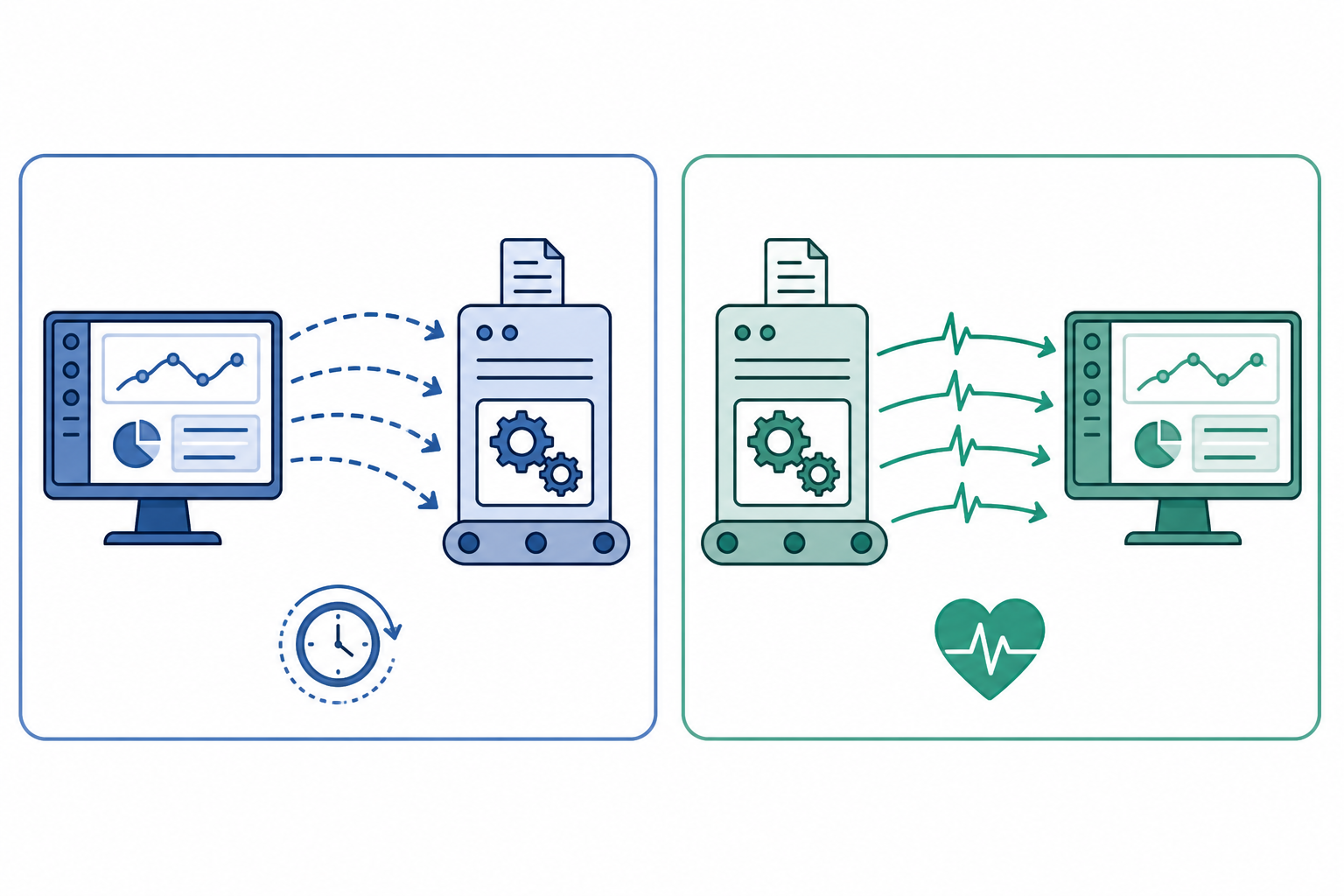
Suggested alt text: "Comparison graphic showing polling checks as monitor-to-server arrows, versus heartbeat monitoring as job-to-monitor arrows."
| Polling Checks | Heartbeat Monitoring | |
|---|---|---|
| Direction | Monitor reaches out to the system | Job reaches out to the monitor |
| Best for | Websites, APIs, servers, ports | Background jobs, cron tasks, batch scripts |
| What it catches | Slow responses, downtime, broken endpoints | Jobs that stopped checking in |
| What it tells you | "This request failed" | "This job never confirmed completion" |
| Needs a public interface? | Yes | No |
That last row is really the crux of it. A polling check tells you a request failed. A heartbeat tells you a job never checked in. Those are different failure modes, and you need both kinds of monitoring if your stack has both public-facing services and background jobs, which, honestly, most stacks do.
Once you start thinking in terms of "what in my infrastructure has no public interface," the list is usually longer than you'd expect. It's worth splitting this into two categories, because they don't behave the same way.
Scheduled batch jobs run, do their work, and finish. A heartbeat here is straightforward: ping once, at the end, on success.
Continuously running workers are a different animal, and this trips a lot of people up. A queue worker processing jobs from Redis or RabbitMQ doesn't "finish" the way a batch script does, it's supposed to keep running indefinitely. A single completion ping doesn't make sense here. Instead, you want a periodic liveness ping (say, every sixty seconds, confirming the process loop is still alive) combined with separate monitoring on queue depth and job throughput. A worker can ping you happily every minute while sitting completely idle because it's stuck on a dead connection and processing nothing, so liveness alone isn't the full picture.

Suggested alt text: "Grid infographic of six scheduled job types commonly monitored with heartbeats: backups, reports, data sync, log cleanup, queue workers, and certificate renewal."
If any of these sound familiar, it's worth asking yourself honestly: would you actually know if this job stopped running tomorrow? If the answer is "not until something else breaks," that's your cue to set up a heartbeat.
The grace period is the window Moonitor waits before deciding a missing ping means trouble. Get this wrong and you'll either drown in false alarms or find out about failures hours too late. It's a bit more involved than just padding the job's run time, though, so let's work through it properly.
A sensible grace period accounts for four separate things:
Here's a worked example. Say you've got a job scheduled hourly that normally takes 12 minutes to run. Setting the grace period to "15 minutes after the last ping" is too tight and too naive, it doesn't account for the schedule itself. A better approach: calculate the grace period from the next expected run time, not the previous ping. If the job is due at 1:00pm, normally finishes by 1:12pm, and you're willing to tolerate up to 15 minutes of lateness before it's worth an alert, your window runs until roughly 1:27pm. If the job also retries once automatically on failure, add the retry's expected duration on top of that.
A few other things that help in practice:
Getting this calibration right is honestly one of the biggest differences between heartbeat monitoring that actually helps and heartbeat monitoring that just becomes background noise you learn to ignore.
Heartbeat monitoring works well beyond backup scripts and data syncs, too. CI/CD pipelines benefit from it as well, especially the ones that run outside normal working hours when nobody's watching the dashboard.
One detail that's easy to get wrong: the ping has to fire only after every step that matters has actually succeeded, not just after the pipeline reaches its final stage regardless of outcome. Something like this:
## pseudocode for a deploy pipeline step
steps:
  - run: npm test
  - run: npm run build
  - run: ./deploy.sh
  - run: ./health-check.sh   # confirms the deployed app responds correctly
  - run: |
      if [ $? -eq 0 ]; then
        curl -fsS "https://moonitor.io/ping/ci-deploy-id"
      fi
A few ways teams put this to good use:
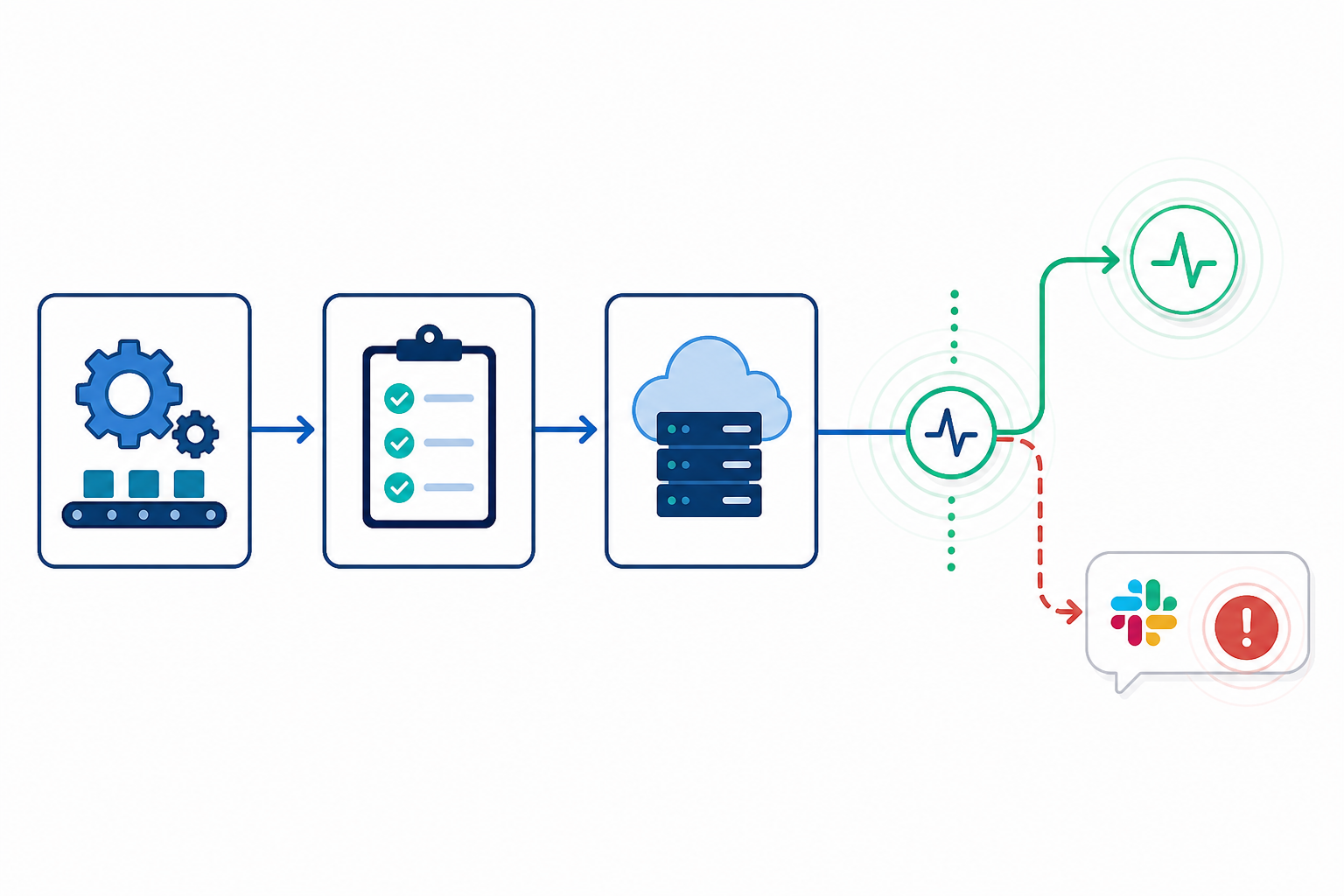
Suggested alt text: "CI/CD pipeline flow diagram showing build, test, and deploy steps, with a heartbeat ping firing only after a successful health check, feeding into a Slack alert for a missed run."
I want to come back to backups specifically because they're the textbook example of why heartbeat monitoring exists. Backups are the classic case where nobody notices anything is wrong until the exact moment they desperately need to restore something, and discover there's nothing usable to restore.
A heartbeat on a backup script closes part of that gap, but it's worth being precise about exactly which part. It confirms the script's code path reached the point where it believed the backup had succeeded, and it can confirm that the backup command itself exited without error, as in the script example earlier. What it doesn't confirm, on its own, is that the resulting file is complete, uncorrupted, or actually restorable. Plenty of backup failures happen partway through, leaving a half-written file that technically "exists" but is useless the moment you try to use it.
To close that remaining gap, pair your heartbeat with a few extra checks:
It's also worth pairing this with grace periods wide enough to account for backup size growth over time. A backup that took eight minutes last year might take twenty-five minutes now that your database has grown, and you don't want that natural growth triggering false alarms every night. If you're in the UK and subject to UK GDPR requirements around data retention and recoverability, having a documented, monitored backup process with restore testing isn't just good practice, it's genuinely useful evidence that your data handling is under control if you're ever asked to demonstrate it.
This is one of the most common heartbeat use cases teams set up first when they start using Moonitor, and for good reason. Combined with the extra verification above, it's low-effort, high-reassurance monitoring for one of the few things in your stack you really don't want to get wrong.
It works by expecting a ping, not by checking a system directly. Your job sends a request to a unique monitoring URL once it completes (or periodically, if it's a continuously running worker). If Moonitor doesn't receive that ping within the grace period you've set, it assumes the job failed, stalled, or never ran, and sends an alert through email, Slack, Discord, Telegram, or a webhook.
Anything that runs on a schedule without a public-facing interface: cron jobs, nightly backups, data sync scripts, report generators, and CI/CD pipeline steps. Continuously running workers benefit too, but usually need periodic liveness pings plus separate monitoring on queue depth, rather than a single completion ping. If a human wouldn't notice the job failed until something downstream broke, it's a good candidate.
Uptime checks, like HTTP/S or ping monitoring, actively reach out to a server or endpoint to see if it responds. Heartbeat monitoring flips the direction, your job reaches out to the monitor instead. This matters because background jobs often have nothing to "poll" from the outside, so uptime checks simply can't see them fail. Cron job alerts specifically rely on this flipped model, since a cron job has no endpoint for anything else to check.
Yes, and it's one of the most popular uses. A heartbeat confirms your backup script's command exited successfully, which catches a large share of silent failures. It doesn't, on its own, guarantee the backup file is complete or restorable, so it's worth pairing it with a checksum or size check and the occasional test restore for full confidence.
If you've got cron jobs, backup scripts, or background workers running right now without any way of knowing whether they're actually doing their job, that's worth fixing before it becomes a 2am emergency. Moonitor's cron/heartbeat monitors take a few minutes to set up properly, and you can try the whole platform free for seven days, no card required, to see how it fits alongside your existing website monitoring, API monitoring, and server monitoring setup.

Heartbeat monitoring explained: learn how cron job monitoring catches silent scheduled-job failures, missed runs and bad output before they cost you.

See how a team built a reliable cron job monitoring workflow with heartbeat checks, smarter alerts, and on-call processes that catch failures fast.

Learn how heartbeat monitoring catches silent cron failures with dead man's switch alerts, grace periods and practical scheduled job monitoring tips!