How to Prevent DNS Hijacking with Real-Time Monitoring: A Sysadmin's Guide
14 min read
Loading...

DNS hijacking happens when attackers gain control of how your domain resolves, redirecting visitors to malicious servers without triggering a single alarm on traditional uptime checks. Your site still loads. Your ping checks still come back green. Everything looks fine on the surface, but your visitors could be landing on a phishing clone instead of your actual login page.
The fastest way to detect this is continuous DNS monitoring that watches your A, CNAME, MX and NS records and alerts you when something changes unexpectedly. That is the difference between finding out in minutes and finding out days later from an angry customer email.
This guide explains how DNS hijacking happens, the warning signs to look for and how to set up real-time DNS monitoring that can detect suspicious changes before they become a major security incident. It also covers UK-specific guidance from the NCSC and protections available through your domain registrar, including considerations for .co.uk domains and generic top-level domains (gTLDs).
The scenario below is an anonymised composite drawn from conversations with sysadmins who have experienced something similar. It is not a single documented case, but it is representative of how a DNS hijacking incident can unfold.
A small SaaS company with a few thousand active users was targeted after an attacker gained access to its domain registrar account, most likely through a reused password exposed in an earlier breach.
Once inside, the attacker changed the domain’s NS records, pointing the domain to a nameserver they controlled. Because they controlled DNS resolution for the domain, they were also able to obtain a valid TLS certificate for the actual domain through automated certificate issuance. This is why the fake login page did not trigger browser warnings.
A certificate for a look-alike domain would not have been enough to fool every visitor. However, a certificate issued for the real domain will validate correctly when the attacker controls its DNS. Anyone entering the company’s URL was routed to the fake website and could submit their credentials directly to the attacker.
The company’s uptime monitoring showed the site as “up” throughout the attack. That is unsurprising: the attacker’s server responded to HTTP requests, returned a 200 status code and presented a valid certificate. Any monitoring system checking only whether the website responds will show a green status while customers are being phished.
It took 36 hours for a customer to contact support and report that the login page “looked different”. By then, an unknown number of credentials had been harvested, and the team was trying to establish what had happened, when it had started and how far the incident had spread.
This is why uptime monitoring should not be treated as DNS security. Website monitoring checks whether a service responds; DNS monitoring checks whether users are being directed to the correct service.
“DNS hijacking” is often used as a catch-all term, but the attack vectors are different, as are the controls that can detect or prevent them. Broadly, DNS attacks fall into three categories.
This is the most consequential type of DNS hijacking because it changes where your domain resolves globally, for every visitor. Common causes include:
Resolver-level attacks do not change your actual DNS records. Instead, they corrupt or intercept the answers returned by specific resolvers.
This type of attack occurs closer to the user than to your organisation’s DNS infrastructure.
This classification matters because DNS record change monitoring is particularly effective at detecting authoritative or registrar-level compromise. It will not detect cache poisoning or a compromised home router when your authoritative records remain correct. Those threats require additional controls, including DNSSEC validation, secure networks and endpoint protection.
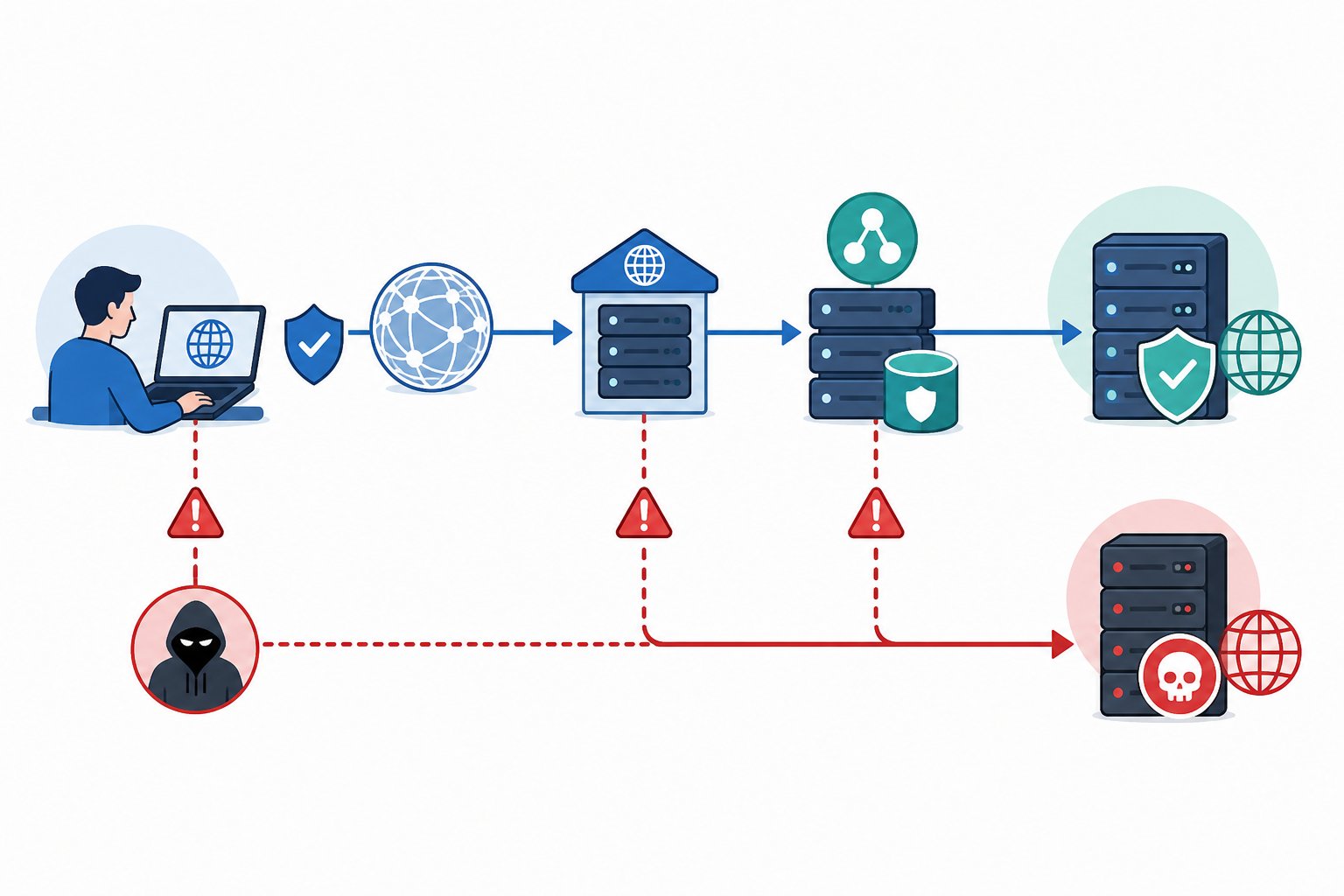
The common thread is the trust built into DNS resolution. Users and applications do not manually verify every DNS response, so attackers attempt to alter or intercept that trust without attracting attention.
DNS hijacking often keeps a website technically operational, so you need to recognise less obvious warning signs and verify them independently.
dig NS yourdomain.com against your usual resolver and compare the result with a public resolver such as 1.1.1.1 or 8.8.8.8. A mismatch may indicate a DNS problem, although propagation and caching should also be considered.A standard “is my website up?” dashboard will not normally show these indicators. They require direct DNS checks, ideally performed continuously by a DNS monitoring service or platform.
Many teams monitor uptime, SSL certificates and domain expiry but overlook DNS records. Continuous DNS monitoring closes that gap by comparing your live DNS configuration with a verified baseline and alerting you to unexpected changes.
At a minimum, monitor your:
Changes to NS and MX records usually deserve the highest priority because they can redirect all website traffic or email.
Record your approved DNS configuration, including expected TTLs and the full set of values for records that return multiple answers. Some load-balanced systems return A records in a different order on each query. That is normal round-robin behaviour, not necessarily a hijack.
Store the baseline somewhere accessible during an incident, assign an owner to maintain it and record when each change was approved. A dated, versioned DNS baseline makes incident response much faster.
Effective DNS monitoring should query your domain’s authoritative nameservers directly and cross-check the results against two or three independent recursive resolvers in different networks.
Checking only your internal resolver may miss an authoritative compromise. Checking only public resolvers may create confusion caused by caching or propagation delays. Using both provides a more complete view of how your domain is resolving.
Legitimate changes, such as a CDN migration or new email provider, should follow a documented approval process. When an alert fires, your team should be able to check the change log quickly rather than guessing whether the alert is genuine.
Choose a DNS monitoring service or broader infrastructure monitoring platform that can:
Keeping DNS monitoring alongside HTTP, SSL and port monitoring can make it easier for your team to investigate related problems from one place.
Multi-region checks help distinguish a genuine DNS change from a temporary resolver problem on one network. DNS caching and polling intervals mean that “real-time” monitoring usually means detection within minutes rather than instantaneous detection.
Pair DNS monitoring with SSL certificate and domain expiration monitoring. An expired domain can sometimes be registered by an attacker before the organisation renews it, allowing the attacker to take control of services that depend on that domain.
DNS monitoring is only useful if alerts reach someone who can respond. Avoid sending every critical alert to an inbox that is checked only once or twice a day.
The goal is not simply to generate more alerts. It is to create reliable DNS security alerts that your team trusts and acts on quickly.
If DNS monitoring identifies an unexpected change, follow a documented incident response process. Preserve evidence before making changes where possible.
DNS monitoring provides fast detection, but it should be combined with controls that reduce the likelihood and impact of a hijacking attack.
These controls are straightforward, but they are easy to postpone until an incident occurs. Implementing them proactively is far less disruptive than responding to a prolonged phishing campaign.
The most reliable method is continuous DNS record monitoring that checks A, AAAA, CNAME, MX and NS records against authoritative nameservers and alerts you to unexpected changes. This is particularly effective against registrar-level and authoritative DNS compromise.
DNS monitoring alone will not detect every attack. Cache poisoning and compromised home routers can affect specific users without changing your authoritative records, so they require additional controls such as DNSSEC validation and endpoint security. Uptime monitoring alone is also insufficient because a hijacked domain may continue responding normally from the attacker’s server.
Secure the registrar account immediately, preserve evidence and contact the registrar’s security team to reverse the unauthorised change. Restore your verified DNS baseline, rotate potentially exposed credentials and check whether email accounts were compromised.
No. DNS monitoring does not prevent an attacker from attempting a hijack, and it does not address every attack type. Its main benefit is reducing the time between an authoritative DNS attack and your team becoming aware of it.
Used alongside DNSSEC, registrar or registry locks, two-factor authentication and a clear incident response plan, real-time DNS monitoring can turn a days-long undetected breach into a short, manageable incident.
DNS hijacking is difficult to spot because it can pass every check that asks only whether something is responding. Start with this checklist:
DNS monitoring complements registrar hardening and a clear incident response plan; it does not replace either. Put all three in place and DNS hijacking can become a minutes-long security incident rather than a days-long crisis.

Learn how DNS monitoring detects unauthorised DNS record changes, exposes hijacking risks, and alerts you before websites and email are disrupted too.

Learn how DNS monitoring helps IT teams spot unauthorized record changes before they cause downtime or hijacking incidents. Practical setup tips insid