Organic Traffic Strategies for E-Commerce Content: 5 Approaches That Actually Move the Needle

Organic Traffic Strategies for E-Commerce: 5 Content Approaches That Actually Sell
Discover practical organic traffic strategies for online retailers in the UK, including buying guides, comparison content, seasonal campaigns, pre-purchase FAQs and product-led content.
If you run content for an online store, you've probably borrowed organic traffic strategies from SaaS or media playbooks and watched them underperform. The stores winning at organic search right now aren't the ones churning out generic "10 Tips for Choosing a Sofa" listicles. They're publishing buying guides, comparison posts and pre-purchase Q&A content that mirrors what shoppers actually type into Google before they buy.
Pair that content angle with steady, sustainable publishing and you get something rare: a traffic asset that compounds month over month and nudges people towards checkout, not just page views.
I've spent enough time in and around e-commerce content strategy to know the gap most stores fall into. They hire a writer, produce a burst of blog posts, watch traffic tick up slightly, then lose momentum because nobody has time to keep it going. Or they follow SEO advice written for SaaS companies and media publishers, and wonder why it doesn't translate to a shop selling trainers or kitchenware.
This post breaks down five practical organic traffic strategies specific to online retail, along with a repeatable way to build each one and keep the whole process sustainable for a small content team.
Why generic SEO advice doesn't work for online retail
Most SEO content playbooks are written with SaaS blogs or media sites in mind. They're often optimised for informational curiosity: someone wants to learn something, you teach them, and authority builds over time. That model works well when the thing you're selling is knowledge itself.
E-commerce is different in three concrete ways: the query types shoppers use, the conversion path from query to purchase, and the catalogue constraints that shape what you can realistically publish. Someone typing "best running shoes for flat feet" is usually further along the decision path than someone researching a SaaS category in the abstract, though exactly how close they are to buying varies by product, price and personal research habits.
What stays consistent is that e-commerce content needs to connect to a specific product or answer, not just satisfy curiosity.
The gap between ranking and selling is where most store blogs quietly fail. You can rank position one for a keyword and still generate very little revenue if the content doesn't connect to a product or answer the specific question standing between a browser and a buyer. I've seen stores proudly report rising organic traffic while their blog contributes almost nothing to sales, simply because the content was built to satisfy a keyword rather than a shopper.
The five strategies below are testable, retail-specific approaches built to close that gap. Each one includes a practical template you can adapt, so it's not just theory.
1. Create buying guides that rank and convert
Buying guides are the workhorse of e-commerce content, and for good reason. They capture high-intent, top-of-funnel searches such as "best running shoes for flat feet" or "how to choose a mattress for back pain." These are queries where the shopper hasn't picked a specific product yet but is actively comparing options.
Google's guidance on helpful content is useful here: a strong buying guide explains how to choose, compares meaningful specifications, acknowledges trade-offs and gives a clear next step towards a purchase. That's a very different standard from a thin "best products" list with no original thinking behind it.
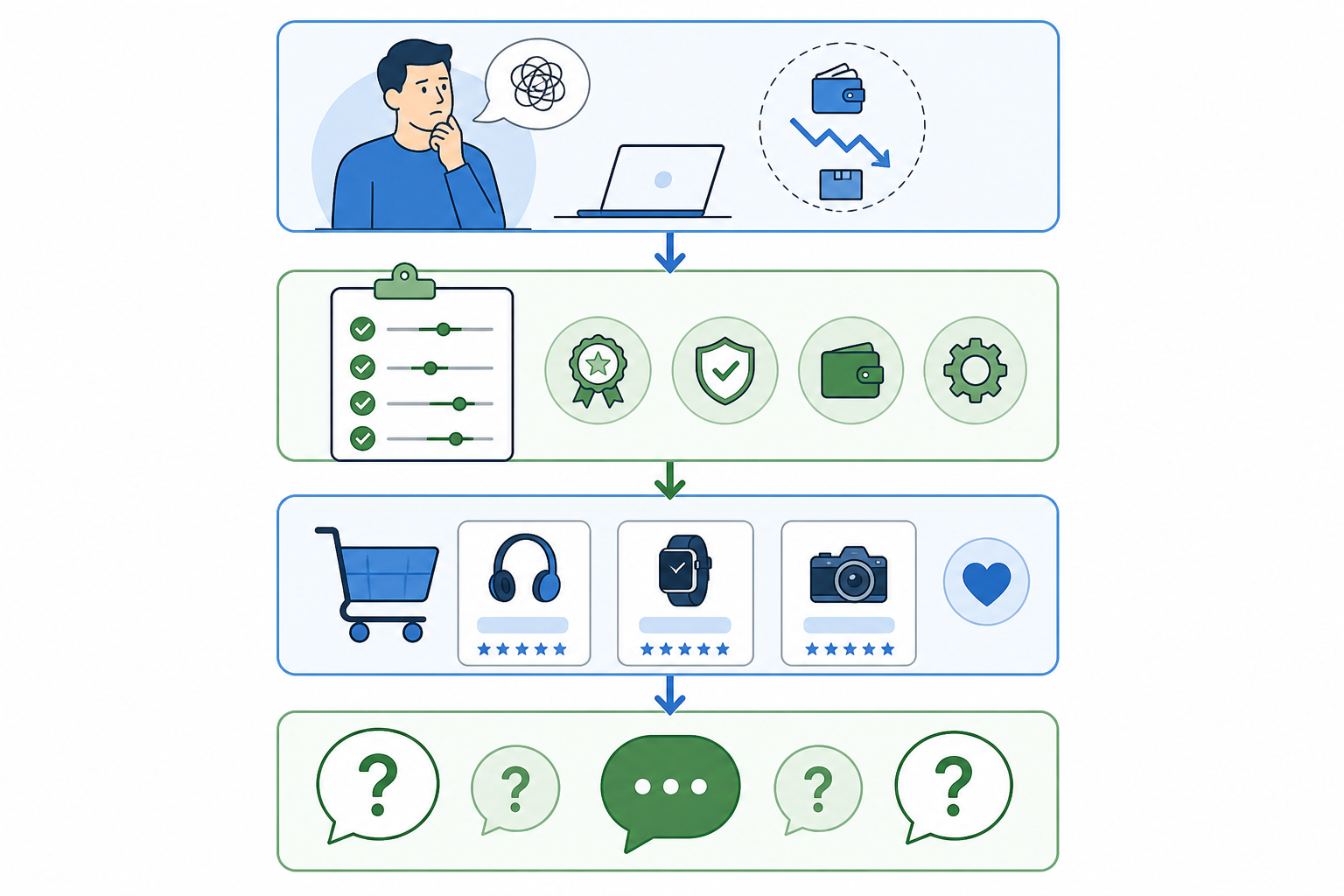
Caption: A template structure for a buying guide, useful to keep next to you when briefing a writer or drafting one yourself.
A reliable structure looks like this:
- Open by naming the exact problem the shopper has, such as flat feet causing overpronation and contributing to knee or hip strain over time.
- Break down what actually matters: cushioning, arch support, width, materials and price bracket.
- Recommend specific products using a consistent comparison framework: price, key specifications, best-for use case and any genuine drawbacks.
- Answer the follow-up questions shoppers still have before checking out.
Buying guide content brief example
Here's a mini brief for a UK running retailer:
- Query: "best running shoes for flat feet"
- Audience: First-time runners researching before their first serious purchase
- Criteria: Arch support, cushioning, width options, price bracket and UK stock availability
- Products: Three to five products from your own catalogue spanning different price points
- CTA: Descriptive anchor text linking directly to relevant product or collection pages
- Refresh trigger: Quarterly, or immediately if a featured product goes out of stock or is discontinued
Done well, a buying guide doesn't feel like an advert. It feels like the natural next step for someone who's just been told exactly what to look for.
One practical note: buying guides go stale fast. Prices change, stock runs out and new models launch. Set a schedule to refresh guides seasonally, updating recommendations and adding a visible "last updated" date. An outdated guide erodes trust quickly, especially when a shopper clicks through to a product that's no longer available. If you're investing in a guide, budget for its upkeep as well as its creation.
2. Publish product comparison posts shoppers actually search for
If buying guides catch shoppers early, comparison posts catch them closer to the decision. Searches such as "X vs Y" and "alternatives to X" are some of the clearest signals of purchase intent you'll find in keyword research, because the shopper has already narrowed their options to a shortlist.
Rather than guessing which comparisons to write, mine your own data. Site search queries, customer service tickets and live chat logs are goldmines. If customers keep asking your support team, "Is this better than [competitor product]?", that's a blog post waiting to be written.
The format matters as much as the topic. Comparison posts that only flatter your own product tend to feel like thinly veiled sales pages, and shoppers spot that instantly. Google's product review guidance recommends being honest about pros and cons, discussing comparable alternatives and explaining which option suits which use case. A comparison post that admits your product isn't the best fit for everyone is, counterintuitively, more likely to convert the right customer.
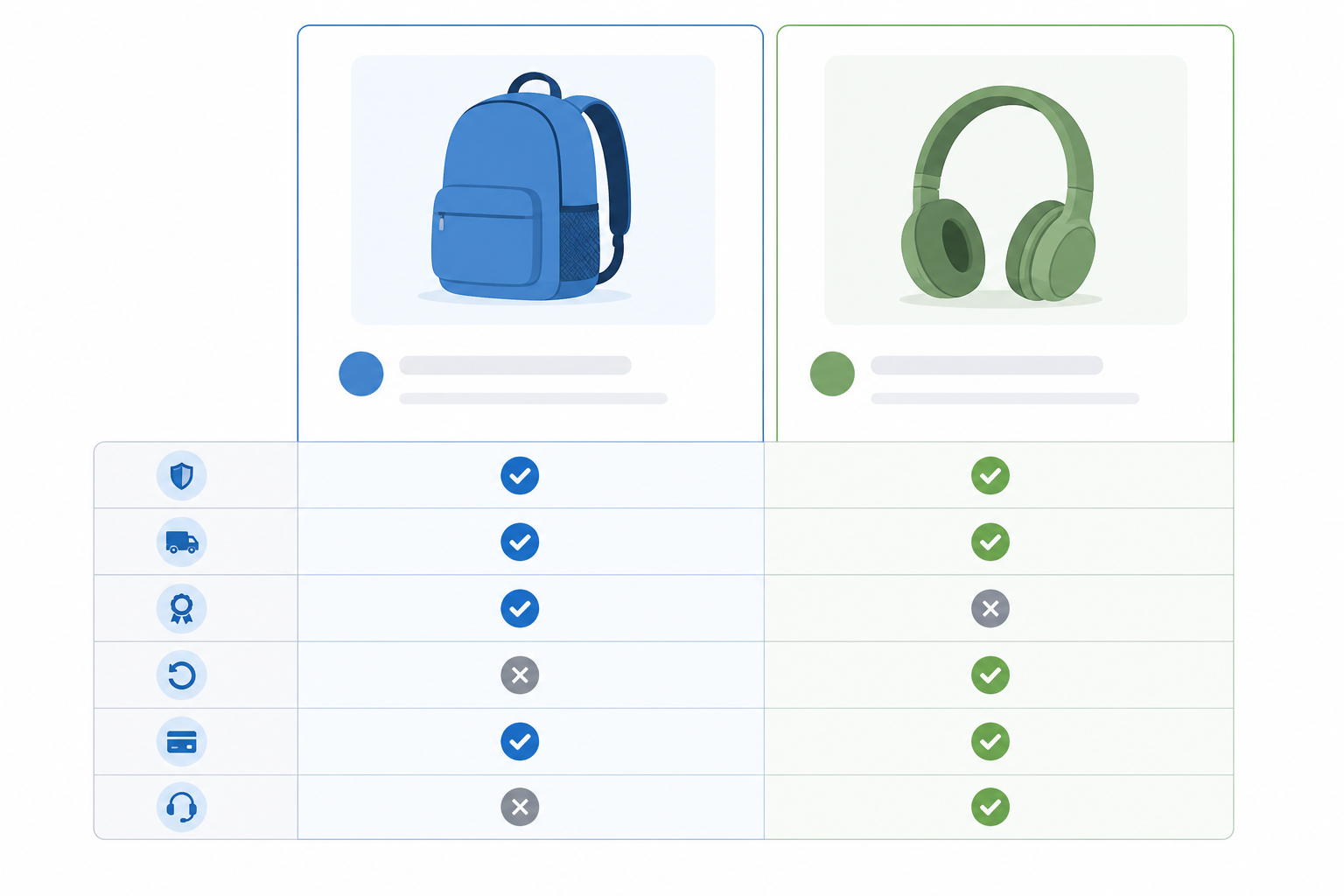
Caption: An illustrative comparison layout, not real product data, showing how feature rows can be scanned quickly.
An illustrative comparison table for UK shoppers, who may also care about delivery and returns, looks something like this:
| Feature | Product A | Product B |
|---|---|---|
| Price | £45 | £60 |
| Best for | Everyday casual wear | Long-distance running |
| Material | Recycled mesh | Breathable knit |
| Warranty | 12 months | 24 months |
| Delivery | Free over £30, 2–3 days | Free over £30, next day |
| Returns | 30-day free returns | 30-day free returns |
| Our take | Great value, less durable | Pricier but built to last |
Tables like this let shoppers scan and decide quickly rather than reading five paragraphs to find the one detail they care about. High-intent comparison searches tend to concentrate clicks heavily on whichever result answers the question most directly, so it's worth putting real effort into a handful of important comparisons rather than spreading your team thin across dozens of weak posts.
Product comparison content template
- Query pattern: "X vs Y" or "alternatives to X"
- Minimum evidence: Genuine, verifiable feature differences rather than marketing copy
- CTA: Links to both product pages using descriptive anchor text
- Key metrics: Click-throughs to product pages and ranking for the comparison query
- Refresh trigger: Whenever either product's price, stock or specifications change
3. Build seasonal content around product launches
Seasonal content is where many e-commerce teams either strike gold or waste effort scrambling at the last minute. The fix is to plan it like a campaign rather than a last-minute blog post, and build it around the UK retail calendar specifically.
Black Friday and Cyber Monday, Boxing Day and the January sales, back-to-school and Christmas gifting all behave differently and peak at different times.
How to plan seasonal e-commerce content
- Identify seasonal search trends 8 to 12 weeks before demand peaks. Search interest for gift guides, seasonal apparel and holiday-specific products starts climbing well before the buying window. Waiting until launch week means publishing into a market that may already have made its decisions.
- Create evergreen seasonal templates you can refresh each year. Rather than writing a new "Christmas Gift Guide for Her" from scratch every year, build a durable page structure and update the products, prices and imagery each season.
- Tie product launches to gift guides and seasonal buying guides. A new product doesn't need its own isolated launch page. It can be introduced inside a relevant seasonal guide where shoppers are already browsing with intent.
- Repromote and update last year's seasonal posts. A page that already has search visibility and backlinks retains more value when refreshed than a brand-new URL starting at zero.
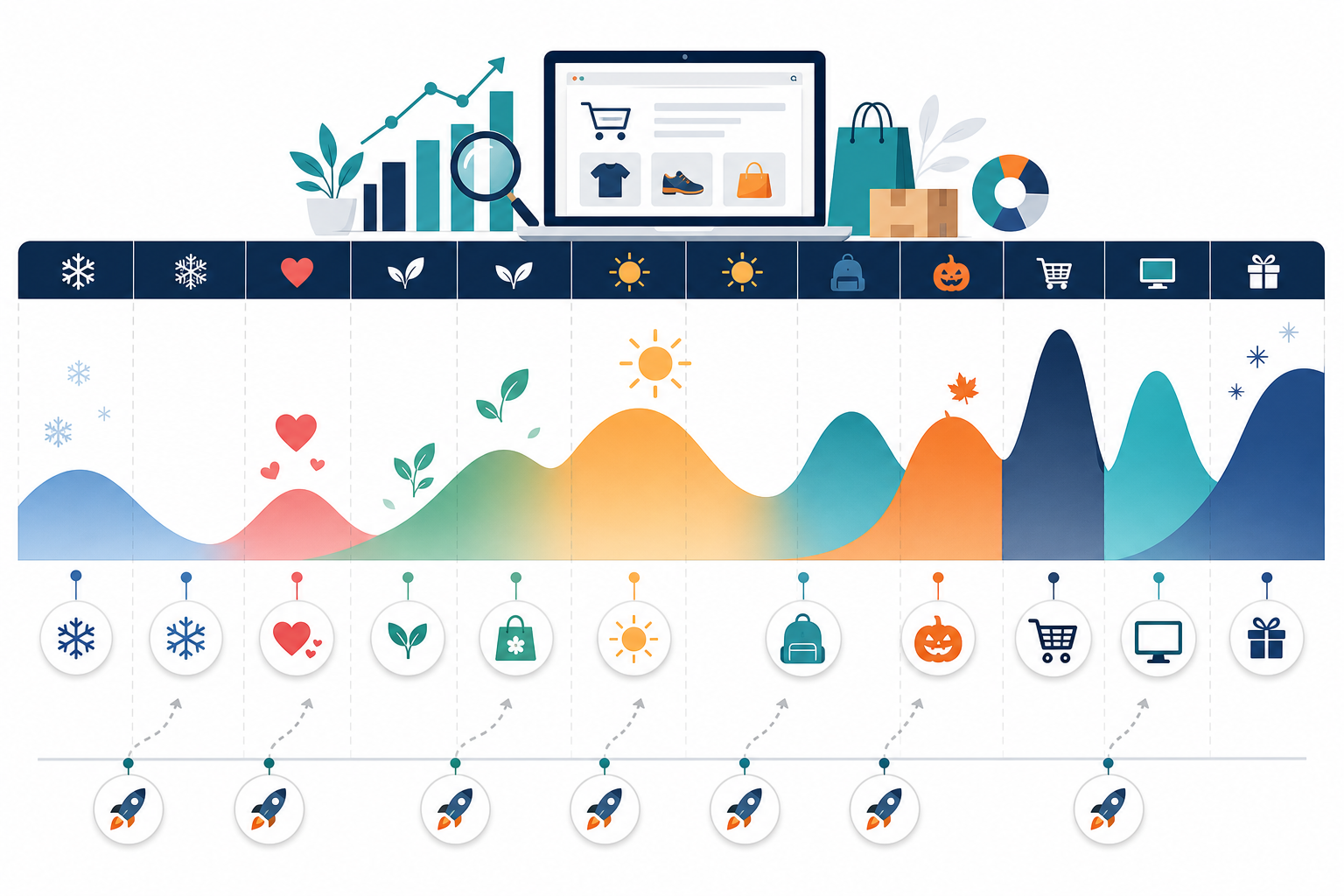
Caption: A rough content calendar showing where UK seasonal peaks (Black Friday, Christmas, January sales, back-to-school) sit against the year.
Seasonal content example for a UK homeware brand
Here's what this looks like for a homeware brand launching a new blanket range in October:
- Weeks 8–12 out: Research seasonal searches for "best blankets for winter" and "cosy gifts for her."
- Week 6 out: Refresh the existing seasonal guide template, adding the new range.
- Launch week: Publish the guide framed around Christmas gifting and link to it from the new product pages.
- Boxing Day onwards: Refresh the same URL for the January sales, swapping in discounted lines.
- Following October: Revisit and update the same page instead of creating a new one.
This approach cuts down the content workload over time. Instead of reinventing seasonal content annually, you're maintaining a small set of high-performing evergreen pages that update rather than multiply. That suits the UK's fairly predictable run of seasonal shopping periods.
4. Answer pre-purchase questions in blog content
This is one of the most underused strategies in e-commerce, and one of the easiest to execute. Every store already has a goldmine of real customer questions sitting in support tickets, product reviews and chat transcripts. The work isn't creating new topics; it's mining what's already there.
Questions such as "Is this sofa fabric machine washable?" or "Does this desk fit in a small home office?" rarely get their own dedicated content, yet they represent exactly the kind of low-competition, high-intent search that can convert well. Someone searching "is X machine washable" is rarely browsing casually; they're close to either buying or abandoning their basket.
Not every question deserves its own URL. If you have several closely related questions with little independent search demand, consolidate them into a single FAQ block on the product page or a broader care guide. Save standalone pages for questions with genuine, recurring demand and enough substance to answer properly.
How to turn customer questions into SEO content
A homeware store might notice dozens of support tickets asking whether a bestselling sofa fabric can be machine washed. Because the question is recurring and specific, it could justify a short standalone page titled clearly around that query. Link it from the product page and the fabric care guide.
Track organic sessions and click-throughs to the product page. If the post doesn't move either metric after a reasonable period, fold it into the main care guide instead of leaving a thin page live indefinitely.
Practical ways to create pre-purchase content include:
- Pull recurring questions directly from support tickets, live chat logs and product reviews.
- Turn genuinely distinct, high-demand questions into standalone posts; group smaller or overlapping questions into an existing FAQ or guide.
- Put the answer clearly near the top of the page. This helps readers scan quickly and gives search engines a clear summary, though it's not a guaranteed route to a featured snippet.
- Link these posts directly from the relevant product pages, since they exist to remove friction at the point of decision.
These posts won't necessarily drive massive traffic volumes on their own. Stacked together across dozens of common questions, though, they can become one of the best-converting sections of an e-commerce blog.
5. Repurpose product data into useful content
Not every piece of content needs a completely new angle. Some of the best-performing e-commerce content is a smart repackaging of data already sitting in your product catalogue and analytics.
The caveat is that repackaging isn't the same as auto-generating. Raw catalogue data still needs verification, interpretation and a genuine editorial angle. Otherwise you risk producing templated pages that add little value and look thin to readers and search engines alike.
Product data content ideas
- Turn product specifications, materials and use-case data into structured comparison or educational content, checking every detail for accuracy before publishing.
- Convert bestseller and trending product data into "Most Popular This Month" or "Trending Now" roundup posts, refreshed on a recurring schedule.
- Mine customer reviews and user-generated content for recurring themes, then build content around what customers consistently praise or ask about.
- Build repeatable content workflows using data you already hold, while giving every piece a human review to check accuracy and add meaningful context.
Product data content template
- Query pattern: "best-selling X" or "trending Y this month"
- Minimum evidence: Verified, current catalogue data plus a real comparison angle, not just a list
- Internal links: Individual product pages and relevant collections
- Key metrics: Organic sessions and conversion rate on the roundup
- Refresh trigger: Monthly for trending content, or whenever specifications and stock change for comparison pages
This content type is particularly useful for scaling a steady production line. It doesn't require fresh ideation every time, but it does require consistent, careful repackaging and editorial review.
How to make organic traffic strategies sustainable
None of the five strategies above matter much if they only happen once. Consistency tends to beat raw frequency in organic search: a store publishing one well-targeted, purchase-intent post a week for a year will generally outperform one that publishes ten posts in a burst and then goes quiet for three months.
That said, treat "weekly" as a starting point to test rather than a fixed rule. A newer site with limited authority might get more value from fortnightly posts with proper research and internal linking than from a rushed weekly quota. A larger, established store might sustain two or three posts a week if it has the editorial capacity to keep quality high.
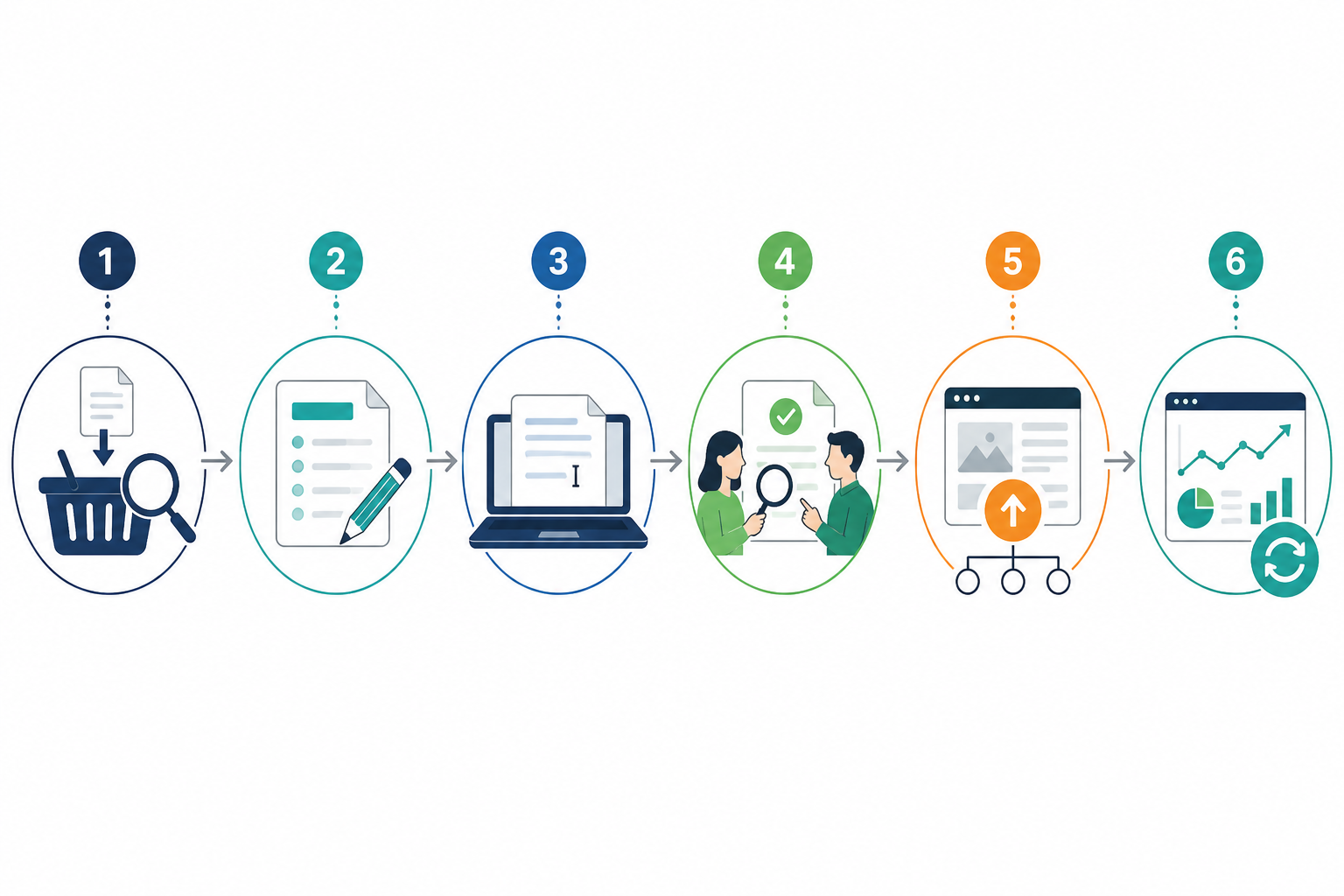
Caption: A vendor-neutral editorial workflow that keeps consistent publishing from turning into a quality problem.
A sustainable e-commerce content workflow
- Topic intake – Pull ideas from search data, support tickets, reviews and site search queries, then log them in a shared backlog.
- Brief creation – Define the query pattern, audience, criteria or angle, products to feature and internal links the piece needs.
- Drafting – Write or generate a first draft against the brief, whether that's done in-house or with an AI writing tool.
- Human review and fact-checking – Check pricing, stock status, product specifications and claims before anything goes live.
- Publishing and internal linking – Publish the content and make sure it links to, and is linked from, relevant product or collection pages.
- Performance reporting and refreshing – Track rankings, sessions and, where possible, click-throughs to product pages. Set a refresh date rather than leaving content to go stale.
The constraint for most stores isn't strategy; it's capacity. Writing five distinct content types consistently, week after week, is a genuine operational challenge for a small marketing team. That's exactly why the workflow matters as much as the content ideas.
As a practical example of how tooling can support this workflow: at Scribe, we built our platform around this specific gap. It generates SEO-structured, long-form blog posts with supporting images, then publishes directly to Shopify, WordPress, Wix or Webflow with one click. We track performance data on published posts so teams can see which content types are earning organic sessions and product-page click-throughs for their specific store, rather than guessing.
Tools like this can remove some of the friction that kills consistency, but they don't replace the human review and fact-checking step above. That remains essential regardless of what produces the first draft.
The strategy matters. But strategy without consistent execution is just a plan nobody finishes.
Frequently asked questions about e-commerce organic traffic strategies
What kind of blog content actually drives e-commerce traffic?
Content that mirrors real purchase-intent searches tends to perform best: buying guides, comparison posts and direct answers to pre-purchase questions. Generic "top tips" listicles rarely convert as well because they don't match how shoppers search when they're close to buying, though results vary by category and keyword competition.
How often should an online store publish new content?
Treat weekly publishing as a starting point to test rather than a fixed rule. Consistency matters more than raw frequency: a store publishing one well-targeted post per week for a year will typically outperform one that publishes in bursts and goes quiet for months. Smaller or newer sites may get more value from a lower, more sustainable cadence with proper research behind each post.
Can blog content directly influence sales, not just traffic?
Yes. Pre-purchase question content and buying guides can directly influence sales when they link clearly to relevant product pages. These formats meet shoppers at the moment they're deciding, which can produce better conversion rates than top-of-funnel awareness content alone. Track click-throughs to product pages rather than relying on traffic numbers alone.
How do I know if a piece of e-commerce content is working?
Track organic sessions, rankings for the target query and, where possible, click-throughs to the product pages it links to. If a post hasn't moved any of those metrics after a reasonable period, refresh it, merge it into a stronger page or retire it rather than leaving it live indefinitely.
How many products should a comparison or buying guide include?
Include enough products to provide a genuine choice without overwhelming the reader. Three to five products usually work well for a buying guide, while two are suitable for a direct comparison post. Beyond that, shoppers may struggle to decide.
Does every customer question deserve its own blog post?
No. Save standalone posts for questions with real, independent search demand and enough depth to answer properly. Group smaller or overlapping questions into a product FAQ or broader guide instead of publishing several thin pages that compete with one another.
Create content like this automatically
Scribe uses AI to generate high-quality blog posts that engage your audience and drive traffic.