The Freelancer's Guide to Never Missing a Content Deadline

The Freelancer's Guide to Never Missing a Content Deadline starts with a simple idea: reliable delivery comes from a good system, not superhuman willpower. If you're a freelancer juggling three, five, or even ten client accounts, you already know the sinking feeling of realising a deadline has snuck up on you. The good news? Missing content deadlines usually isn't a discipline problem – it's a systems problem. This guide explains why freelance deadlines get missed and how to build a buffer, batching routine and toolset so it stops happening.
The freelancers who never seem to scramble aren't working longer hours or possessing superhuman willpower. They've built a buffer instead of working right up to the wire, they batch their content creation into dedicated blocks rather than starting from scratch every time, and some use AI writing assistants to speed up the first draft. The goal isn't cramming more into your day – it's building a system where content deadlines rarely feel urgent in the first place.
Let's break down exactly how that works.
Why Freelancers Miss Content Deadlines – And It's Not Laziness
Before fixing the problem, it helps to understand why it happens. In my experience talking to freelancers across the UK – including several juggling clients around bank holidays, half-term childcare and the usual end-of-tax-year crunch – the same handful of issues come up again and again. None of them are about being lazy or disorganised as a person.
- Underestimating how long content actually takes. Writing a blog post isn't just typing words. It's research, structuring, drafting, editing and often a round of client feedback. What feels like “a couple of hours” often becomes half a day once you factor in everything around the actual writing.
- Juggling multiple clients with overlapping deadlines and no visibility across them all. When each client lives in a different inbox or spreadsheet, it's incredibly easy to lose track of what's due when – until two deadlines collide on the same Thursday.
- No buffer time built in. If every piece of content is finished the night before (or the morning of) it's due, one delay – a sick day, a slow client response or an internet outage – cascades into missed deadlines elsewhere.
- Reactive scheduling. Working on whatever feels most urgent, rather than what's actually due soonest, means the loudest client often gets prioritised over the one with the nearer deadline.
- Manually writing every piece from scratch. Without systems that scale, every article starts from a blank page, which is one of the biggest time drains in a freelancer's week.
Recognising which of these apply to you is the first step. Most freelancers find it's a mix of at least three. If you're not sure which, try a quick self-audit for two weeks: log how long research, drafting, revisions, client approval and publishing actually take for each piece. Most people are surprised by how much time sits in approvals and revisions rather than the writing itself – and that's usually where the buffer needs to be biggest.
The Freelancer's Guide to Never Missing a Content Deadline: Building a Buffer
Here's the core idea that changes everything: instead of finishing content the day it's due, aim to finish it ahead of schedule – the exact gap depends on the client and content type, which we'll get into below. That gap is your buffer, and it's what absorbs the inevitable disruptions – a difficult client call, a bout of flu or an unexpected life event – without any of it turning into a missed deadline.
A buffer isn't one-size-fits-all. A quick 500-word update for a client with a light approval process might only need two or three days of headroom. A 2,000-word cornerstone piece for a client with a multi-person sign-off chain – common with larger UK businesses where marketing, legal and a director all need to weigh in – might need two full weeks. A simple way to size it is to take your average turnaround time for that content type and client, then double it. That doubled figure is your internal deadline, sitting comfortably ahead of the real one.
The challenge, of course, is finding the extra time to build that buffer in the first place. This is where AI content generation can genuinely help. Tools like Scribe are designed to produce a full draft blog post – including an outline, images and on-page SEO elements – considerably faster than writing from scratch, according to the platform's own documentation. I'd treat any specific time or word-count claim from a vendor as a starting point to verify yourself rather than a guarantee, but the general principle holds: a decent AI first draft removes the blank-page problem, and that's where a meaningful chunk of buffer time comes from.
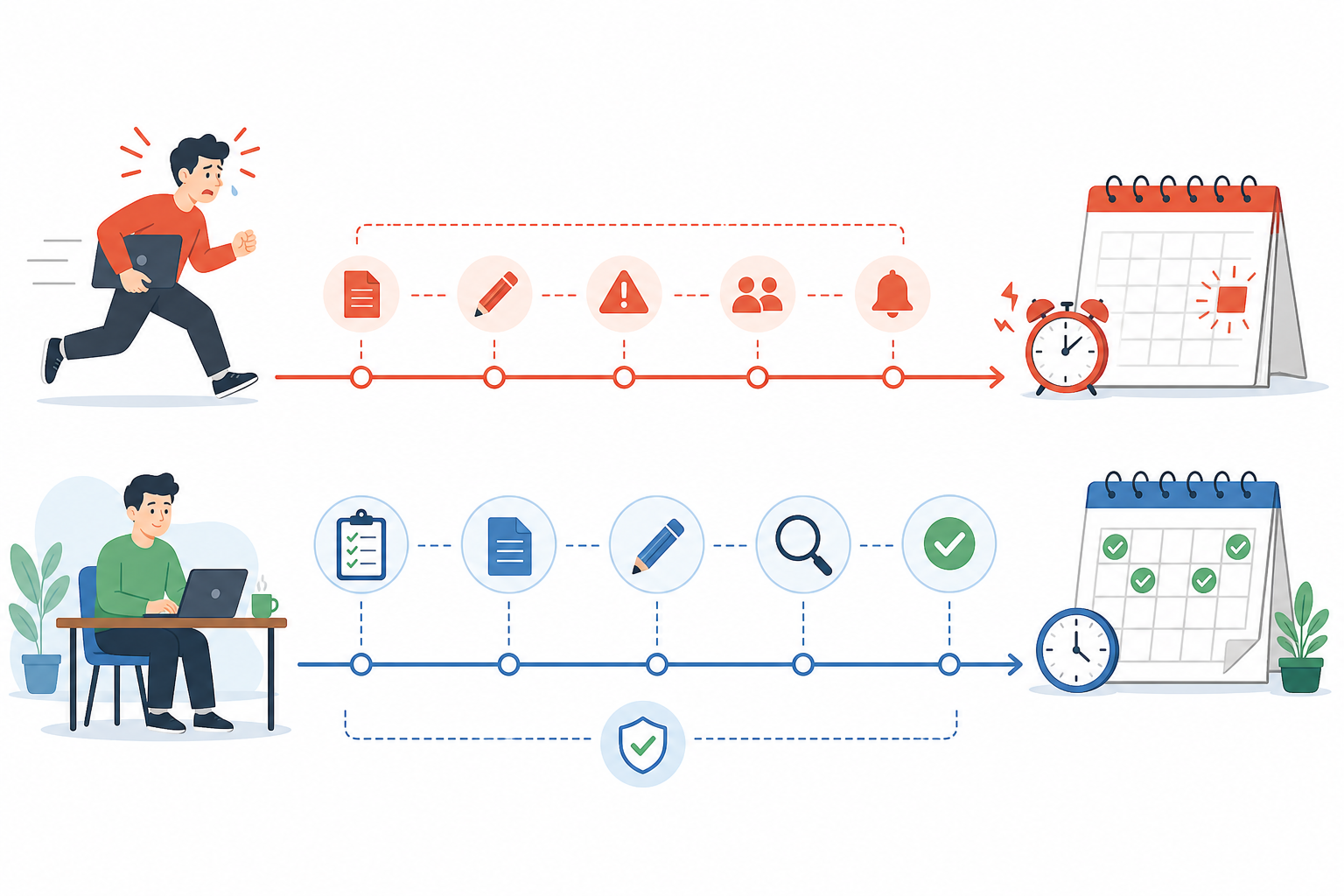
The key mindset shift here is important: reclaimed time should go towards building your buffer, not towards taking on more clients. It's tempting to fill freed-up hours with more billable work, but if you do that every time, you'll always be one bad week away from missing something. Use the time savings to get ahead first – then think about scaling up.
Some AI platforms, including Scribe, also use performance data from published articles to refine future outputs over time. In principle, that should mean drafts need less editing the longer you use the tool, though the amount of editing any individual draft needs will still depend heavily on your client's niche, tone and how technical the topic is. Don't expect it to fully replace your review step – more on that below.
How to Use AI Responsibly for Client Content
Speed only helps if what you're delivering is actually usable. Before any AI-assisted draft goes to a client, it's worth running through a short checklist:
- Fact-check every claim, statistic and named source. AI tools can generate plausible-sounding information that isn't accurate.
- Check for originality. Run drafts through a plagiarism checker, especially for competitive or heavily covered topics.
- Protect client confidentiality. Don't paste unpublished client data, pricing or internal documents into public AI tools unless you've confirmed how that platform handles data.
- Check your client's stance on AI-assisted content. Some clients want full disclosure that AI was used in drafting; others have specific policies against it. Get this in writing.
- Review image licensing. If a tool generates or sources images, confirm you have the rights to use them commercially before publishing.
- Treat the draft as a draft, not a finished product. Your read-through for brand voice, accuracy and tone is what makes it genuinely client-ready – not the AI output alone.
Built-in quality checks in some platforms can catch obvious issues, but they're not a substitute for your own judgement, particularly on anything client-sensitive.
How to Batch Create and Schedule Content
Once you've got a faster way to produce drafts, the next piece of the system is how you structure your time. This is where batching comes in – and it's a genuine time-saver if you're currently writing content client by client, day by day.
Here's how to set it up:
- Set aside one dedicated block per week for content planning across all clients. Look at every deadline coming up in the next two weeks in one sitting, rather than discovering them piecemeal.
- Group similar content types together. Do all your outlines in one pass, then all your drafts in the next. Context-switching between different formats and clients is one of the biggest hidden time-wasters in freelance work.
- Use AI writing assistants to generate first drafts in bulk during the batch session, where appropriate. Rather than writing one post and moving on, generate several in a row while you're already in that headspace – and skip this step for clients who've asked you not to use AI drafting.
- Set a client approval cut-off, not just a publish date. Build in a fixed window – say, three working days – for the client to review and respond before your internal deadline. If they go quiet, that's a decision point to chase early, not the night before it's due.
- Review and personalise each piece for brand voice and client-specific requirements. This step matters – the AI can get a draft most of the way there, but your knowledge of each client's tone and audience is what makes it feel genuinely theirs.
- Build in a small reserve for urgent requests. Leave roughly 15–20% of your batch capacity unscheduled each week for the client who calls with something time-sensitive. That way, an urgent job doesn't have to cannibalise someone else's buffer.
- Schedule everything using automated publishing so nothing relies on same-day manual posting. Once a piece is approved, it should go straight into a queue – not onto your daily to-do list.
The beauty of batching is that it removes decision fatigue. You're not asking “what should I work on today?” every single morning – you already know, because it was decided during your planning block.
A Quick Freelance Content Capacity Example
Say you're managing three clients: one wants two 800-word posts a month, another wants one 1,500-word post a week, and a third wants a monthly newsletter plus two short social posts a week. Roughly mapped out, that's about 10–12 hours of writing and editing time a week, before revisions. Add a 25% buffer for revisions and unexpected requests, and you're realistically looking at 13–15 hours a week dedicated to content production. Blocking that time out explicitly – rather than assuming it'll happen “whenever” – is what actually protects your buffer.
The Best Tools for Managing Multiple Content Deadlines
A good system needs the right tools behind it. You don't need dozens of subscriptions – just a handful that cover the essentials: tracking deadlines, creating content quickly and publishing without manual intervention.
| Tool type | Examples | Best for | Limitations |
|---|---|---|---|
| Project management | Trello, Asana, Notion | Visibility across every client's deadlines in one place, so clashes get spotted early | Requires discipline to keep updated; doesn't write or publish content for you |
| Calendar blocking | Google Calendar, Reclaim.ai | Protecting batch-creation time from client calls and admin | Only works if you actually treat blocked time as non-negotiable |
| AI blog post generator | Scribe, Jasper, Writesonic | Speeding up first drafts and reducing blank-page time | Still needs human fact-checking, brand-voice editing and client sign-off |
| Automated publishing | Scribe, Buffer, native CMS scheduling (WordPress, Shopify, Wix, Webflow) | Removing same-day manual posting | Content still needs to be approved and loaded ahead of time to work |
| Analytics dashboards | Google Analytics, Scribe's performance tracking | Seeing which content is actually performing, to prioritise formats that work | Takes a few months of data before patterns are reliable |
A few things stand out when you put these side by side. Project management tools solve the visibility problem. Calendar blocking protects the time you need for focused work. AI content generation and automated publishing can meaningfully cut down the time spent writing and posting – but none of these tools remove the need for your own review, judgement and client relationships. They're there to buy you time, not to run the business for you.
If you're evaluating an AI writing tool, ask for a trial period and test it on a real (non-sensitive) piece of client work before committing. Compare the editing time it actually saves you against the subscription cost – that's a more reliable signal than any headline claim.
A Sample Weekly Content Workflow for Freelancers
Theory is useful, but a concrete weekly rhythm is what actually sticks. Here's one example structure to test for a month before adapting it to your own client load – treat it as a starting template, not a rulebook, since your mix of clients and content types may need a different shape entirely.
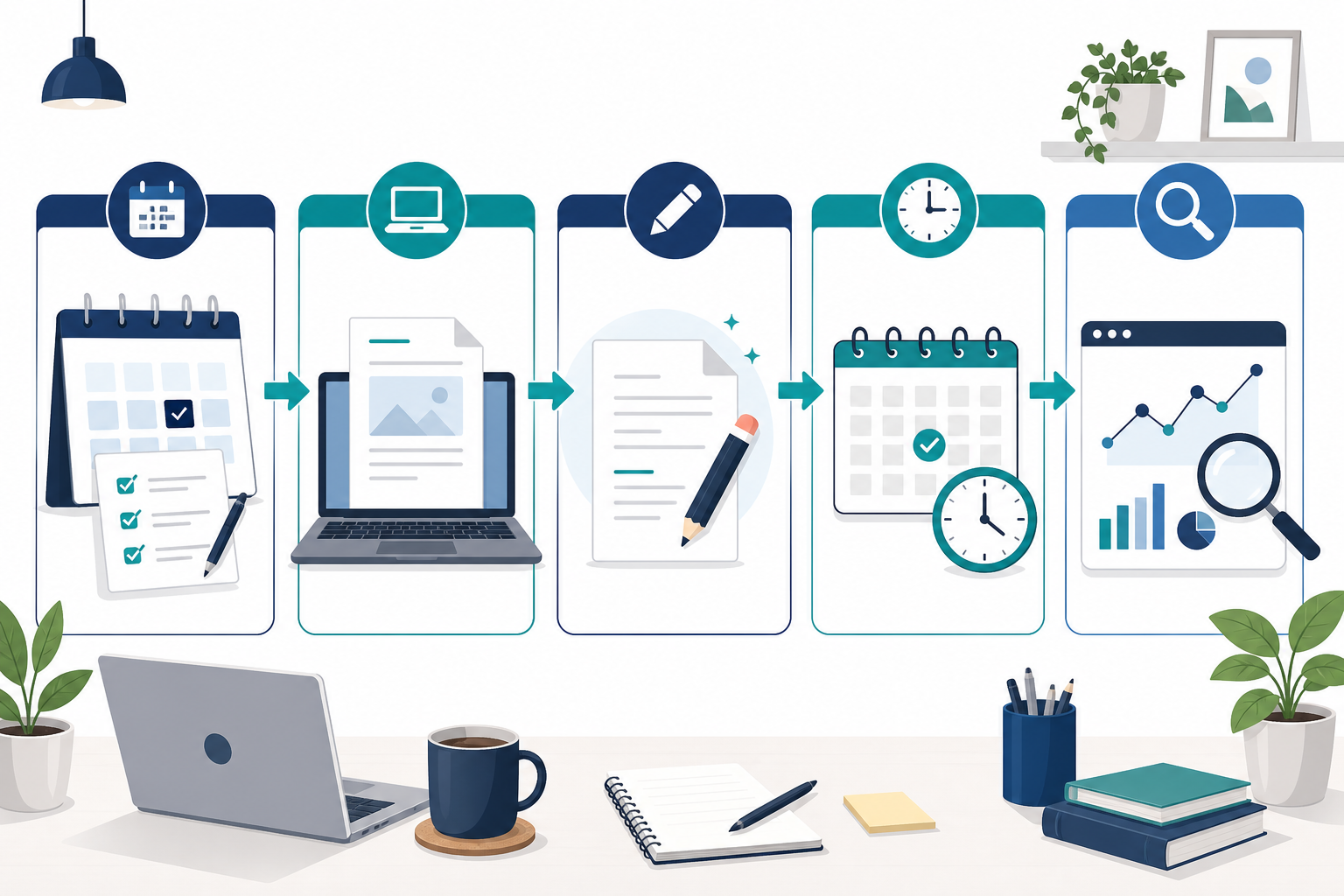
- Monday: Review all client deadlines for the week and next week. Look across every project in one sitting and flag any potential clashes before they become urgent problems.
- Tuesday: Batch-generate blog drafts and outlines using an AI content platform where suitable. This is your heavy drafting day – get as many first drafts done as possible while you're in that flow.
- Wednesday: Edit and personalise drafts. Add brand voice, client-specific examples, fact-check any claims and add any details the AI wouldn't know about their business.
- Thursday: Send drafts for client approval and schedule anything already signed off. By this point, approved pieces should be queued for automated publishing, not sitting in your to-do list.
- Friday: Check performance data from previous posts and adjust your content calendar accordingly. This is where content marketing becomes genuinely strategic rather than just a treadmill – use what's working to inform next week's priorities.
If you only work part-time on content, or your clients are spread thinly across the week, a compressed version works too: combine Monday and Tuesday into a single half-day planning-and-drafting session, and fold Thursday's scheduling into Wednesday's editing session. The specific days matter less than having a fixed, repeatable rhythm.
Notice that in this structure, deadline day itself isn't a work day at all – it's just the day content happens to go live, because the actual work was finished days earlier. That's the entire point of building a buffer.
Frequently Asked Questions About Content Deadlines
How can freelancers avoid missing content deadlines?
The most reliable way is to stop working deadline to deadline and instead build a buffer of finished content sitting ahead of schedule – how far ahead depends on the client's approval process and content length. Combine this with batching your writing sessions and using an AI writing assistant to speed up drafting where appropriate, and most freelancers find they go from constantly scrambling to consistently ahead of schedule.
What tools help with content scheduling?
A mix of project management tools like Notion or Trello for tracking client deadlines, plus a content platform for drafting and auto-publishing, covers most of what freelancers need. Tools such as Scribe can generate draft blog posts and publish to platforms like WordPress, Shopify, Wix or Webflow, which cuts down the manual scheduling work – though you'll still want to review and approve everything before it goes live.
How do I manage multiple client deadlines at once?
Visibility is key – map every client's deadlines onto a single calendar so you can spot clashes weeks in advance rather than discovering them the day before. Pair that with batch content creation so you're producing several pieces in one sitting instead of starting from scratch for each client every time, and build in a small reserve of unscheduled time for urgent requests.
Is it worth using AI content generation for client work?
For many freelancers managing multiple accounts, yes – it's less about replacing your voice and more about removing the blank-page starting point. That said, always fact-check AI-generated content, check your client's policy on AI-assisted drafting and avoid pasting confidential client information into public tools. Treat any AI output as a first draft that still needs your review, not a finished piece.
What if a client goes quiet and my deadline is already at risk?
Build an approval cut-off into your process – for example, three working days before the internal deadline – so a quiet client becomes visible early rather than on the day itself. If you're past that point with no response, flag it to the client immediately with a clear revised timeline, rather than waiting and hoping they'll reply in time.
Final Thoughts on Never Missing Freelance Content Deadlines
Missing a deadline once in a while happens to everyone – but if it's a recurring pattern, it's worth stepping back and looking at your system rather than blaming yourself for poor time management. Build a buffer sized to each client's actual approval process, batch your work and let AI content tools take a first pass at drafting – carefully and with proper fact-checking – so you can spend your time on the parts only you can do: the strategy, the client relationships and the personal touch that makes content actually land.
If you want to start this week, here's the short version: centralise every client's deadlines onto one calendar today, book your first weekly batching block before Friday and set an internal deadline for your next piece of content that sits at least a few days ahead of the real one. Once that system is in place, deadlines stop feeling like emergencies and start feeling like just another date on a calendar you're already ahead of.
Create content like this automatically
Scribe uses AI to generate high-quality blog posts that engage your audience and drive traffic.