How to Publish Blog Posts Directly to Shopify With AI (No Developer Needed)

A practical, no-fluff guide to connecting an AI content tool to your Shopify store, publishing SEO-ready posts without copy-pasting, and knowing when to keep a human in the loop.
You can publish blog posts to Shopify with AI by connecting a content platform to your store through Shopify's app permission system, no developer required. Here's the workflow in one line: connect the app, choose which Shopify blog it should publish to, generate a draft, verify the fields Shopify actually uses (title, meta description, URL handle, images and alt text), then publish or schedule from there.
Not every platform supports each step identically, so I'll flag what to check regardless of which tool you choose, and walk through the actual screens using Scribe, the tool I work with and know best, as a concrete example.
Full disclosure upfront: I have a commercial relationship with Scribe, which is why it's the worked example here rather than a neutral pick. The underlying Shopify connection mechanism, app permission screen, blog selection and field mapping work similarly across most native Shopify integrations. Still, confirm each step against whichever tool you actually choose.
If you've been putting off blogging because it feels like one more technical headache on top of running your store, I get it. I've talked to plenty of UK Shopify owners who know they should be blogging but keep pushing it to "next month" because copying text into the Shopify admin, resizing images and writing meta descriptions feels like its own part-time job. A lot of that friction can now be automated. Let me show you exactly how, what to verify before you trust it, and where a human still needs to stay in the loop.
Why Shopify store owners need a blog
Paid ads stop working the moment you stop paying for them. A blog behaves differently: a well-optimised post can keep attracting search traffic for months after you publish it, provided it stays relevant and you keep maintaining it. Shopify's own help documentation recommends blogging as one way to support SEO and build a longer-term relationship with customers, alongside things like site structure and page speed.
Your product pages are built to convert people who already know what they want. Most shoppers don't start there. They start by Googling a question, a comparison or a problem: "best material for a winter coat" or "how to clean a cast iron pan." A blog gives you somewhere to answer those questions that your product pages simply weren't built to handle.
The stores that do well here tend to be the ones publishing consistently over months rather than chasing one viral post. That's not because Google directly rewards frequency, it doesn't. Publishing volume alone isn't a ranking factor. It's because consistent, useful content gradually builds topical coverage and internal linking that a single post never can, and that combination is what search visibility actually rewards.
Why Shopify blog publishing often falls apart
Before getting into Shopify blog automation, it's worth naming why so many Shopify blogs start strong and quietly die after three posts. In my experience, it's rarely a strategy problem. It's usually one of these:
- The time cost is real and easy to underestimate. Orbit Media's long-running blogger survey puts the average time to produce a single post at close to four hours once you include research, writing, editing and formatting. That's a hard block to protect when you're also managing stock and answering customer emails.
- Freelance writers are inconsistent. Voice, quality and turnaround time vary from post to post, and briefing someone properly takes almost as long as writing it yourself.
- Formatting and metadata are their own job. Shopify's blog feature is capable enough, but someone still has to organise tags, upload and resize images, write SEO titles and hit publish. That's friction on top of the writing itself, not instead of it.
- Motivation fades once the initial push is gone. Most abandoned blogs I've seen didn't stop because the strategy failed. They stopped because post four never got written.
Automating the mechanical parts, drafting, formatting and image handling, doesn't fix a bad content strategy. But it does remove the specific friction that kills otherwise reasonable plans before they've had time to work.
Is AI content for Shopify the right approach for you?
Before you connect anything, it's worth being honest about whether AI-assisted publishing fits how you run your store.
| Good fit | Poor fit |
|---|---|
| Fashion, homewares and general consumer goods where you already know common customer questions | Regulated or safety-sensitive products, such as supplements, medical devices and children's products, where factual errors carry real risk |
| You're comfortable reviewing drafts for accuracy before they go live | You don't yet know what your customers actually search for |
| You're publishing, or want to publish, weekly or fortnightly and manual formatting has become the bottleneck | You're an occasional blogger who only needs one or two posts a year |
| You have a clear brand voice you can describe to the tool | You need highly technical, specification-heavy content that requires deep product engineering knowledge |
AI tools are good at producing content quickly. They're not a substitute for understanding your market. If you're in the "poor fit" column on customer knowledge specifically, spend a bit of time on keyword and customer research first, then come back to automation once you know what you want the blog to cover.
How to connect an AI content tool to Shopify
"Integration" can sound like it requires a developer. For platforms with native Shopify support, it doesn't. The connection runs through Shopify's own app permission system, the same mechanism used by review widgets or email apps, so you're approving access rather than sharing credentials.
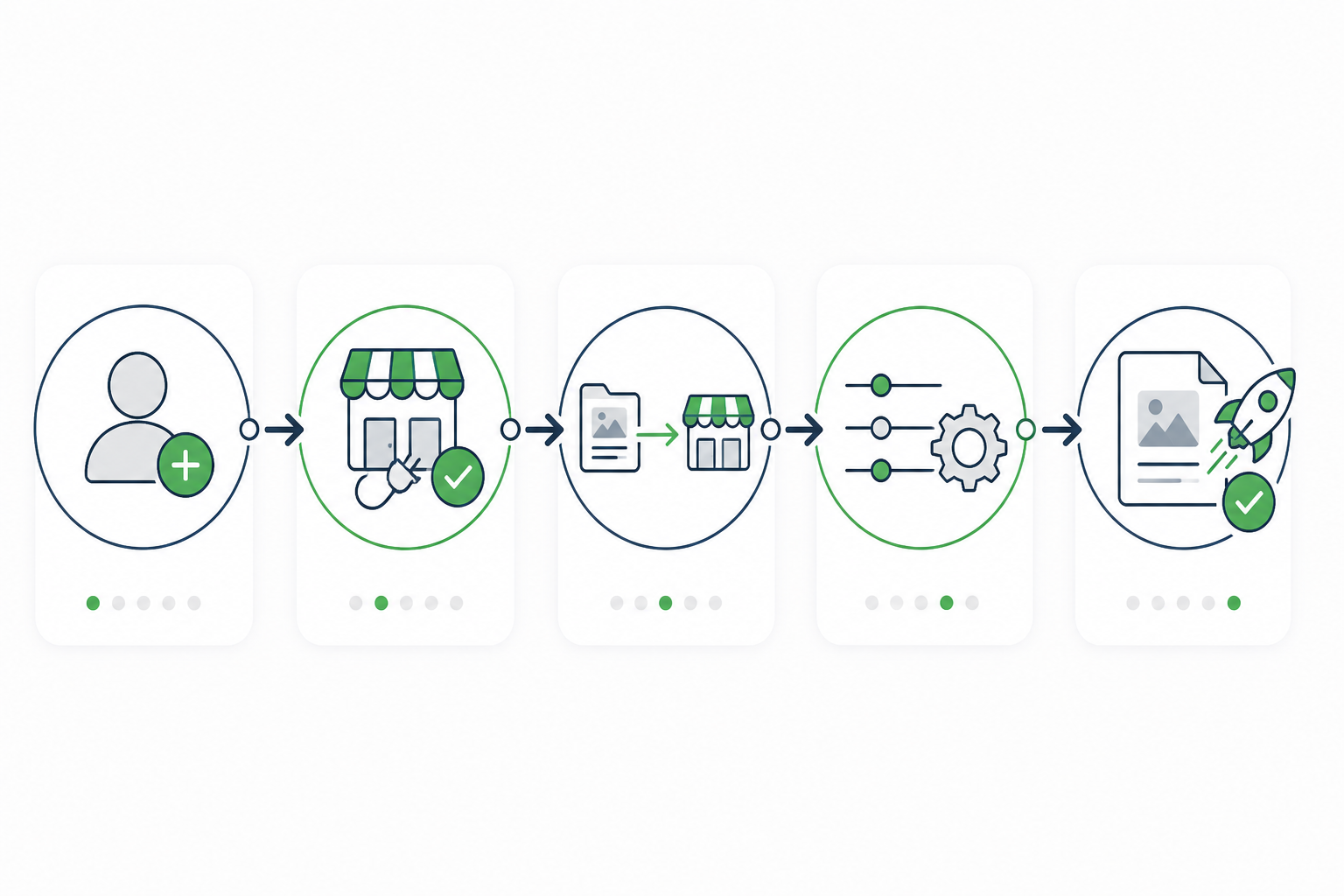
Here's the sequence, walked through using Scribe, although the general shape holds for most native integrations:
- Create an account with the AI content platform. This is a standard SaaS sign-up, with nothing Shopify-specific yet.
- Install the app from within the platform, then authenticate through Shopify. You'll land on Shopify's app permission screen, which lists the exact scopes being requested, typically read and write access to blog content, Shopify's
contentscope, rather than customer data, orders or payment information. Read this screen. Don't click through it on autopilot. - Choose your blog destination inside Shopify's Online Store > Blog Posts area. If your store runs multiple blogs, such as a "News" blog and a "Guides" blog, you'll pick where new posts should land. This is also where the article's URL handle, author field and tags get set, either by you or by the platform's defaults, so check those defaults before your first real post.
- Set your preferences for tone, topics and publishing frequency inside the AI platform so the output matches your brand voice rather than sounding generic. If you're selling into the UK, specify British spelling and terminology here, since many AI tools default to American English unless told otherwise.
- Publish a test post as a draft and check it field by field. Confirm it arrived as a draft rather than live. Scribe defaults to draft on the first run, but confirm this for whichever tool you use. Then check the SEO title and meta description under "Search engine listing preview," the URL handle, whether images uploaded with alt text populated, and whether internal links actually resolve when clicked.
If you ever want to stop using a platform, revoke its access from Shopify's "Apps and sales channels" settings. Posts already published stay in your blog as regular Shopify articles, fully editable by you afterwards, since the connection doesn't lock content to the tool that created it.
What to look for in a Shopify blog automation tool
Different platforms bundle different capabilities under the same "AI blog" label, so it's worth checking these specifically rather than assuming they're all equivalent:
| What to check | Why it matters |
|---|---|
| Native Shopify app, rather than manual export and import | Determines whether you get one-click publishing or just AI-written text that you still have to paste in |
| Draft mode as a default, not just an option | Lets you review before anything goes live, especially important in month one |
| Scheduled auto-publishing | Needed if you want a hands-off publishing cadence once you trust the output |
| Where images come from and their licensing terms | AI-generated images usually come with usage rights bundled into your subscription, but confirm this with the specific vendor rather than assuming |
| SEO metadata fields, including title tag, meta description and alt text | Saves repetitive manual work, but always verify accuracy before trusting it |
| Pricing tied to article volume | Determines whether a monthly plan covers your intended publishing frequency |
Scribe covers the first five of these with native Shopify support, draft-by-default publishing and scheduled auto-publish once you opt in. Check current article limits and pricing tiers directly with the provider, since these change. Whatever tool you're evaluating, ask for these specifics rather than taking "AI-powered Shopify blogging" at face value.
How one-click publishing to Shopify works
It's worth being precise about what "one click" actually covers, because the phrase can undersell the useful part and oversell what still needs your attention.
| Handled automatically by the platform | Still worth checking yourself |
|---|---|
| Article text generation | Factual accuracy, especially product specifications, pricing and availability |
| Image sourcing or generation | Whether the image genuinely matches the product, a generic "wool coat" image isn't your wool coat |
| SEO title, meta description and alt text | Whether the metadata is specific enough to be worth ranking for |
| Pushing everything to Shopify as one article, not separate uploads | Whether internal links resolve and the tone matches your brand |
A realistic example of where this goes wrong: an AI tool describing a jacket as "fully waterproof" when your actual product is water-resistant. That's a one-word difference that could generate a returns headache and, in the UK specifically, brushes up against advertising accuracy expectations. It's exactly the kind of thing a spellchecker won't catch and a five-minute read-through will.
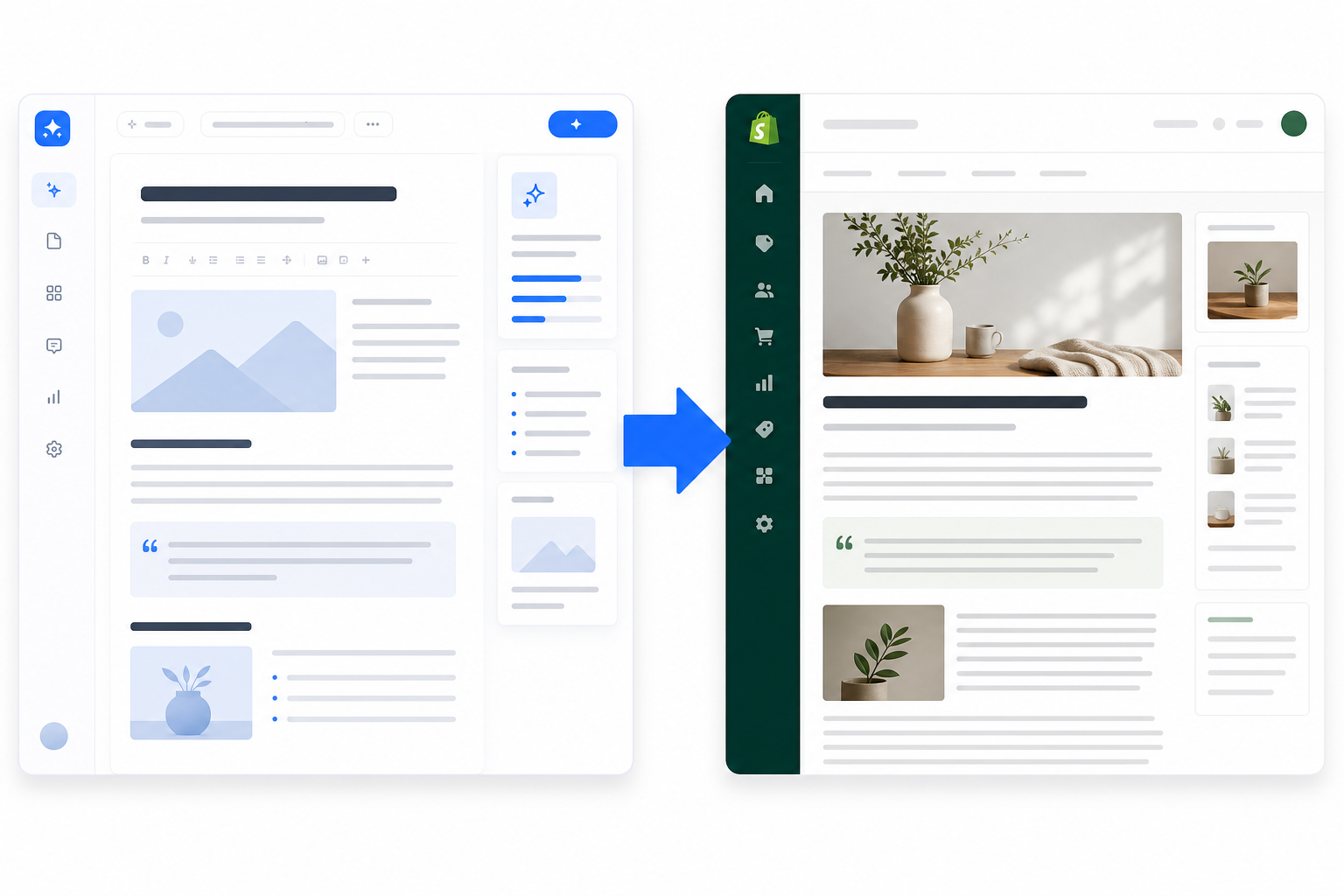
Most platforms, Scribe included, give you a choice between draft mode, which holds the finished post for review before it touches your live store, and auto-publish, which pushes content live on a schedule you set without that step. Starting in draft mode for the first month, then moving to auto-publish once you trust the output for a given topic, is a sensible default rather than a compromise.
Some platforms also offer a quality score, a checklist-based rating of structure, keyword targeting and readability. Treat this as a structural sanity check, not proof the content is accurate or ranking-ready. A high structural score says nothing about whether a product claim is still correct.
Can you fully automate a Shopify blog?
Technically, yes. With scheduled auto-publishing, you set a cadence, weekly or twice weekly, and the system runs without you touching it day to day.
Whether you should run it fully hands-off is a separate question. I'd suggest keeping a light human check-in, especially in the first few months. Brand voice drifts over time and benefits from occasional spot-checks. Product catalogues change, so old posts can end up referencing discontinued lines. And factual claims involving specifications or comparisons are worth a second look before they go live under your name.
Some platforms describe their systems as "self-improving." If you see that claim, ask the vendor specifically what data drives it, whether it's account-level performance data, manual feedback or generic model updates, and whether you can verify the improvement yourself. Don't take the label at face value; I can't verify what any specific competitor means by it, and I'd rather flag the question than repeat an unverified claim.
A reasonable split is simple: automation handles the repetitive parts, drafting, formatting and scheduling. You handle the strategic parts: what topics matter, what customers actually ask and where you want to show up in search results.
SEO tips for Shopify blog posts
Publishing consistently is only half the job. Here's what that looks like in practice, with a worked example for a UK homewares store selling wool coats:
- Write around what customers genuinely search for. For a UK audience, that means accounting for local terminology, seasonal patterns such as Boxing Day or the January sales, and delivery expectations that differ from US-focused content.
- Set the title tag and meta description as separate fields from the on-page headline. On-page title: "5 Ways to Style a Wool Coat This Winter." SEO title tag, in Shopify's search engine listing preview: "Wool Coat Styling Tips | 5 Winter Outfit Ideas." Meta description: "Five practical ways to style a wool coat for UK winters, from smart-casual to weekend wear, plus what to pair it with." URL handle: /blogs/guides/wool-coat-styling-tips. These are genuinely separate fields in Shopify's admin, and it's easy to leave the SEO fields blank by accident.
- Link internally from the post to the actual product or collection page, such as linking "wool coat" in the text through to your wool coats collection. This is one of the simplest ways to turn blog traffic into store traffic, and it's frequently skipped.
- Add image alt text as a matter of accessibility and context, not as a guaranteed ranking shortcut. Use something like "charcoal wool coat styled with cream jumper and ankle boots" rather than "IMG_2043."
- Base topic choices on what has actually performed before, where you have that data, using Search Console impressions and clicks rather than guessing.
- Prioritise usefulness and accuracy over volume. Google's guidance is explicit that AI-assisted content isn't penalised for how it was produced. Content published mainly to game rankings, generic, repetitive, low-value posts, can be. The fix isn't avoiding AI. It's making sure whatever you publish would genuinely help the person reading it.
What results can you expect from AI content on Shopify?
I don't want to oversell this. One Scribe customer reported a 340% increase in organic traffic over six months. I'm citing that as a single documented case, not a typical outcome: it depended on their starting traffic baseline, niche, keyword competitiveness and how much they promoted the content elsewhere. No platform can guarantee a comparable number for your store, and I'd treat any chart implying otherwise with suspicion, including the illustrative one below, which shows this one case, not an expected trajectory.
What's more reliably true is the mechanism: a single great post might spike traffic for a week and then fade. A steady stream of reasonably good, well-targeted posts tends to build a traffic base that keeps growing, because each post targets a slightly different query and they compound over months rather than one week.
To track whether it's working for you, watch total clicks, impressions, average position for your target queries, and, if you can connect it, which posts are assisting actual purchases rather than just getting views, all in Google Search Console. Expect a lag: new posts typically take several weeks to be indexed and start accumulating impressions, so don't judge week-two data too harshly.

How to publish blog posts to Shopify with AI: your first 30 days
- Week 1: Connect your platform to Shopify and publish one test post in draft mode. Verify formatting, image transfer with alt text and metadata fields all came through correctly in Shopify's preview before considering it a success.
- Week 2: Set a content calendar covering at least 6-8 topics based on real customer questions or search queries you've identified, not brainstormed ideas. Turn on scheduled publishing, but keep draft review switched on.
- Week 3: Pull your first Search Console data. Don't expect meaningful clicks yet, indexing takes time, so focus on whether posts are appearing in impressions at all. Read every published post once for tone and accuracy.
- Week 4: Decide, based on that data and your own read-through, whether to move any post categories to auto-publish. Set yourself a simple rule: for example, move a topic category to auto-publish only after three consecutive posts pass review without edits.
By the end of the month, you'll have a working system with real data behind it, rather than a good intention that fizzled out after post three.
Most platforms with native Shopify integration, Scribe included, offer either a free trial or a low-cost starting tier specifically so you can run this exact 30-day test before committing to anything larger. Check current plan details and article limits before you connect your store, since these vary by provider and change over time.
Frequently asked questions about Shopify blog automation
Can I automate my Shopify blog completely, or do I need to review every post?
You can fully automate it with scheduled publishing, which pushes posts live on a set cadence without a manual step. Most store owners start with a hybrid approach instead: AI generates and formats everything, but a quick read-through happens before it goes live. They then shift towards full automation once they trust the output for a given topic category.
How do I publish AI content directly to Shopify without copying and pasting?
You connect an AI content platform to your store through its Shopify app integration. It uses Shopify's API to push posts directly into your blog, including text, images and SEO metadata, in one action. Check during setup whether posts arrive as drafts or go straight live, since this varies by platform and by your own settings.
What Shopify plan do I need to publish blog posts?
The blog feature itself is available on Basic Shopify and every plan above it. What varies isn't your Shopify plan so much as the AI platform's own subscription tier and the specific API scopes its app requests. Confirm both separately: your Shopify plan for the blog feature and the AI tool's plan for article volume and features.
Can I edit an AI-generated post after it's published?
Yes. Once pushed to your blog, it becomes a standard Shopify article, editable in your admin exactly like anything you wrote yourself. There's no lock-in; if you disconnect the AI platform later, published posts stay exactly as they are.
Can an AI tool update or overwrite an article I already published manually?
This depends entirely on the platform. Some only create new posts and won't touch existing content; others let you select an existing article to refresh. Check this specifically before assuming either way, since overwriting an edited post you've manually changed could undo work you didn't want undone.
What are the best tools for Shopify blogging if I have no technical background?
Look for platforms with native Shopify integration rather than generic AI writers that require manual export and import. Compare them on the criteria in the table above: draft mode, scheduling, image rights and metadata automation. Scribe connects directly to Shopify, WordPress, Wix and Webflow; other providers exist too, so check permission requirements and image rights terms before connecting your store, regardless of which you pick.
Will AI-generated blog content rank in UK search results?
It can, provided it's genuinely useful, accurate and structured around real search intent rather than generic filler. Consistency and internal linking help, but no tool can guarantee rankings. Google's guidance is clear that content produced mainly to game search results, regardless of whether AI or a human wrote it, is the kind that can be penalised.
How much does it cost to run an automated Shopify blog?
Costs vary by platform and by how many articles you need each month. Most, including Scribe, offer tiered plans scaling from a handful of articles a month to higher volumes, so you can start low and scale once you've seen how traffic responds. Check current pricing directly with the provider, since it changes.
Related Articles
Create content like this automatically
Scribe uses AI to generate high-quality blog posts that engage your audience and drive traffic.