How to Sell Digital Downloads: eBooks, Templates & More

How to Sell Digital Downloads in South Africa: eBooks, Templates & More

The short version: pick a product that solves one specific problem, prepare clean files in formats everyone can open (usually PDF, or a PDF containing a Canva or Notion link), set a fair price in rand, and use an online store builder or ecommerce platform that delivers files securely and automatically after payment. Then you can spend your time on promotion instead of checking EFTs and emailing files by hand. 🎉
The rest of this guide walks through each step in plain English, with a few warnings along the way. It's written for first-time sellers in South Africa, and I've flagged where local rules matter.
What Counts as a Digital Download? 📦
A digital download is anything your customer buys and receives as a file or a link, with nothing to deliver. They pay, they get access, and you never have to book a courier or drop a parcel at a Pargo point.
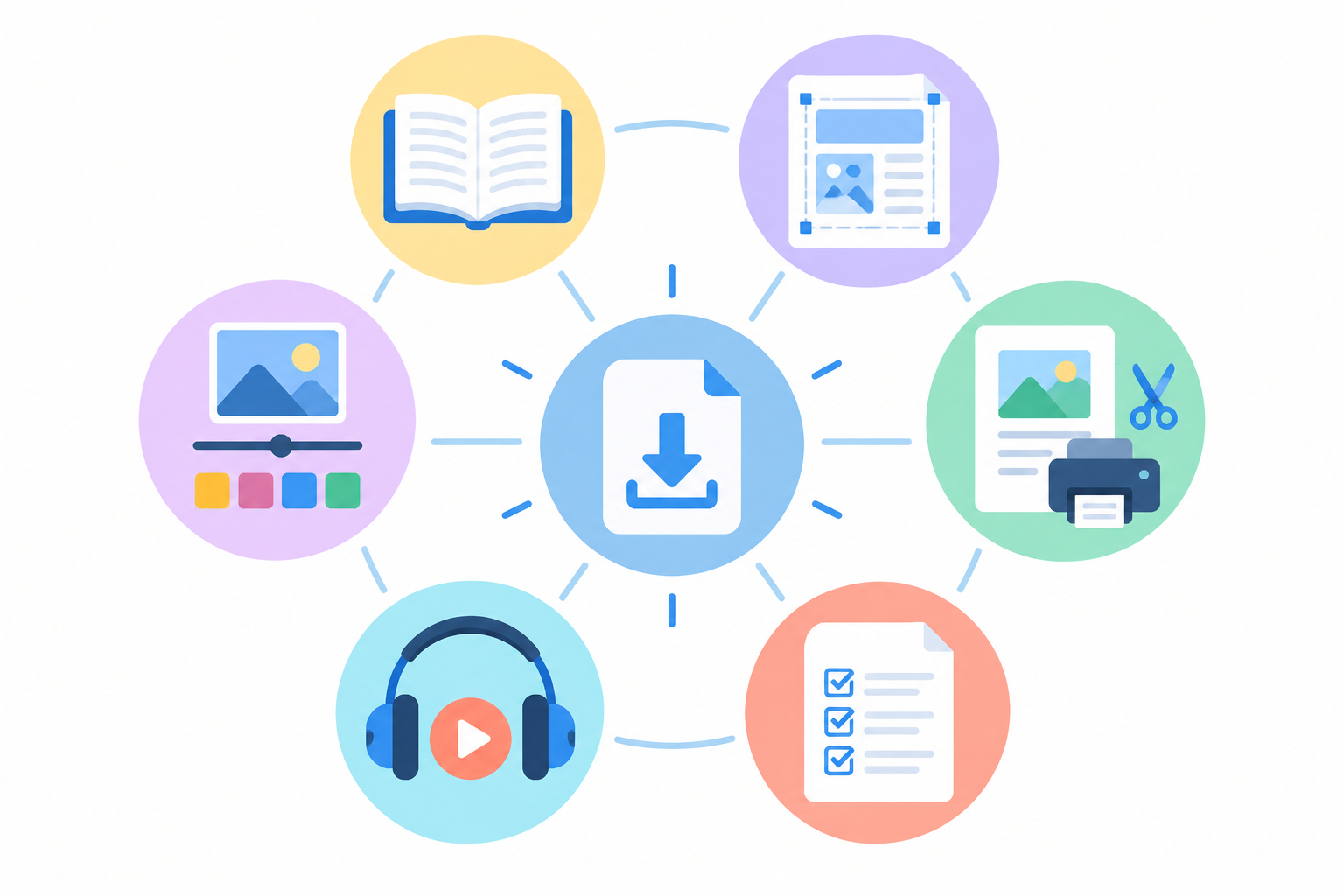
Here's what usually falls into the category:
- Ebooks and guides: how-tos, playbooks, recipe collections, short industry reports.
- Templates: Canva designs, Notion dashboards, spreadsheets, CV and business plan templates.
- Printables and planners: budget sheets, meal planners, wedding checklists, habit trackers.
- Creative assets: photo presets, fonts, stock photos, music, SVG cut files, patterns.
- Learning products: worksheets, checklists, mini-courses, audio and video files.
Why do digital downloads suit creators so well? There's no stock to hold and no courier to organise. You make the thing once and sell it as many times as people want it. And if you've already built something for yourself, like a spreadsheet, a checklist or a Canva layout, you may be sitting on a product already.
What Digital Products Sell Best?
I'm not aware of any reliable South African league table of top-selling digital downloads. Marketplaces publish overall figures (Etsy, for example, reported 89.6 million active buyers and 5.6 million active sellers for 2024, according to its investor reports), but those cover everything on the platform worldwide. They don't show demand for any particular type of download, and they tell you nothing about South African buyers, so take claims of 'the number one best-selling digital product' with a pinch of salt.
What I can say is that the winners tend to save time, solve a clear problem or give a quick result. A buyer should look at the product and think, 'That would save me an afternoon.'
Here's a rough comparison of popular types. The price ranges are my own ballpark starting points for South African buyers, not verified benchmarks, so use them as a sanity check rather than a rule.
| Product type | Effort to create | Typical starting price (rand) | How repeatable are sales? |
|---|---|---|---|
| Niche, practical ebook | Medium | R99–R250 | Good if the topic is evergreen |
| Canva or Notion template | Low–medium | R99–R350 | High, especially for small businesses |
| Spreadsheet tool (budget, invoices) | Medium | R150–R450 | High; solves a recurring problem |
| Printable planner or checklist | Low | R49–R180 | Good; peaks in January and before the festive season |
| Presets, fonts, design assets | Medium–high | R150–R450 | Good if your style is distinctive |
| Mini-course or audio/video | High | R350–R1,500+ | Good, but support needs are higher |
| Bundles | Medium | R350–R900 | Strong; lifts average order value |
Templates and planners for small businesses, job seekers and students are reliable evergreen categories, because those people always have a deadline looming, whether it's matric exams or a job application. Ebooks work best when they're niche and practical. 'A guide to money' is hard to sell. 'A 30-day budget reset for freelancers with irregular income' is much easier.
A quick (hypothetical) example
Picture Thandi, a freelance bookkeeper in Pretoria who has used the same tracking spreadsheet with clients for years. She tidies it up, adds a one-page instruction sheet, and lists it for R180 as 'Freelancer Provisional Tax Tracker'. She hasn't invented anything new. She's just packaged something she already used. That's the mindset I'd encourage: look at your own working files first.
Tip: validate demand before you build. Check what your audience keeps asking for in your DMs, comments and WhatsApp messages. If three people have asked 'Can I get a copy of that?', you have your answer.
Preparing Digital Download Files for Instant Delivery
Good file preparation means fewer support emails later. Here's the process I'd follow:
- Finalise and proofread. Then use the product the way a customer would. Open it on your phone, click every link, try the template from scratch.
- Choose the right format. See the breakdown in the next section.
- Name files clearly.
brandname_product-name_v1.pdfbeatsfinal_FINAL_2.pdfevery time. - Keep file sizes reasonable. Plenty of South African buyers download on prepaid mobile data, so compress large images and video where you can.
- Add a 'start here' page. Spell out what to click and what software buyers need, especially for Canva or Notion links.
- Bundle multiple files into one ZIP so the customer gets a single tidy download. Mention that they'll need to unzip it, since some phones and tablets need an extra step.
- Add licensing terms. State whether it's for personal use only or whether buyers can use it commercially.
Two habits are worth building early: keep a backup of your original, editable files, and use simple versioning (v1, v2, v3). When you update a product, you'll thank yourself.
What File Formats Work Best for Templates and eBooks?
The golden rule is to pick the format your customer can open without thinking. Here's how the common options compare:
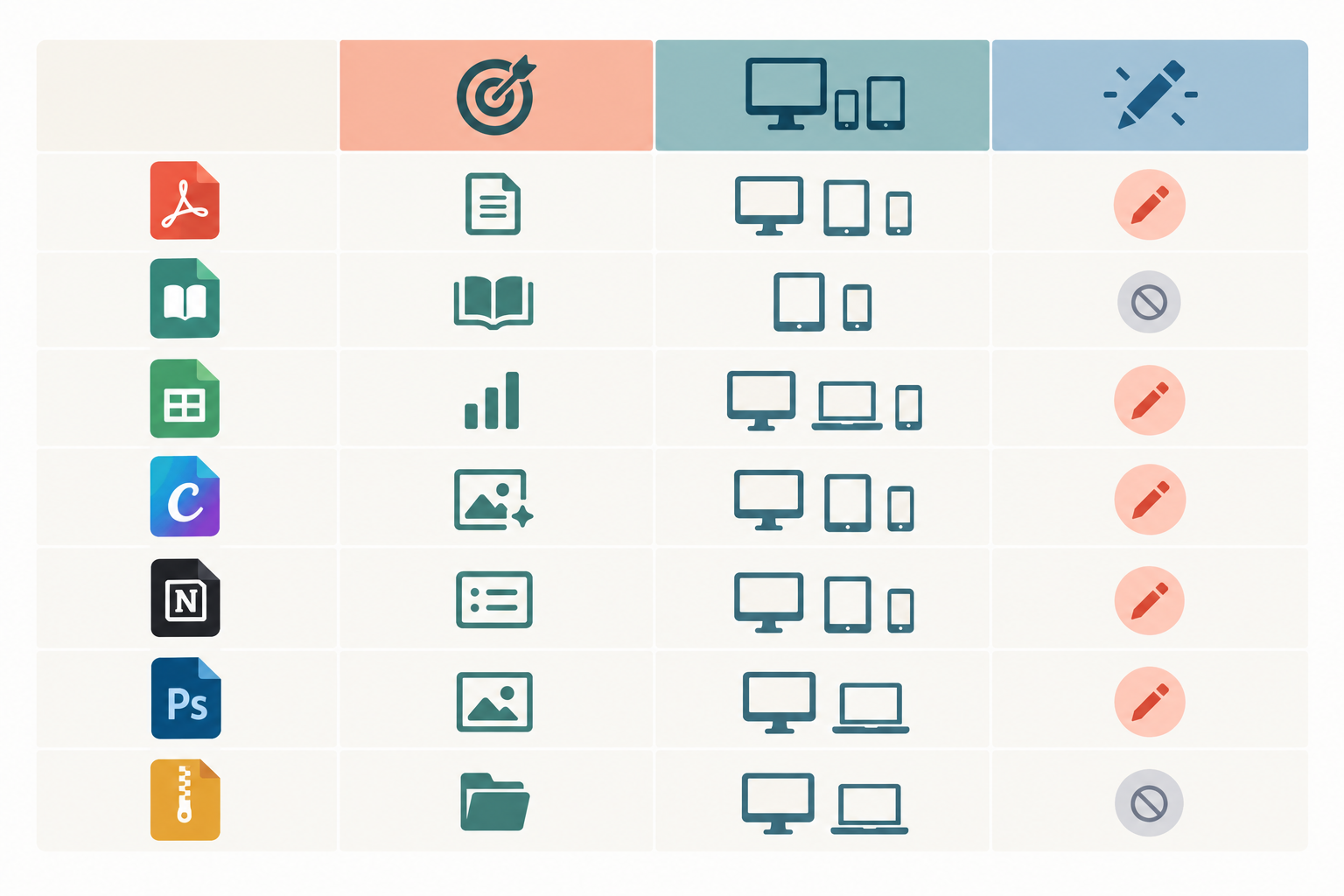
| Format | Best for | Compatibility | Editable? | Piracy risk | File size |
|---|---|---|---|---|---|
| Ebooks, workbooks, checklists, printables | Opens on most devices with a standard PDF viewer | Limited | Medium; easy to copy | Small–medium | |
| EPUB | Ebooks for e-reader fans | E-readers and reading apps (support varies by device) | No | Medium | Small |
| Canva / Notion link (in a PDF or as a shared link) | Editable templates | Needs a free account on that tool | Yes | Medium; depends on link settings | Tiny |
| XLSX / Google Sheets | Spreadsheet tools | Excel and Google Sheets; check formulas work in both | Yes | Higher | Small |
| PSD, AI, SVG, PNG | Design assets | Needs specific software (state which) | Yes | Higher | Medium–large |
| MP3 / MP4 | Audio and video | Widely supported, though playback can depend on device and software | No | Medium | Large |
| ZIP | Bundles of any of the above | Needs extracting; most modern devices cope, some need an app | Depends on contents | Same as contents | Varies |
A few practical notes. For ebooks, offering both PDF and EPUB is a nice touch, since e-reader fans often prefer EPUB while everyone else is happy with PDF. For Canva, Notion and Google Sheets templates, the usual approach is a short PDF containing the template link. And whatever you sell, state software requirements on the product page. Nothing causes refund requests faster than someone discovering they need Photoshop.
Before launch, open your files on a second device and, for template links, a second account. It takes ten minutes and catches most problems.
Pricing Strategies for First-Time Digital Download Sellers 💰
Pricing is where most first-timers wobble. Here's the approach I'd suggest.
- Price the outcome, not your hours. If your template saves a small business owner three hours, it's worth more than a cheap printable, even if the printable took you longer to make.
- Use comparable products as a reference point, not a ceiling. Look at similar listings in your niche, but don't automatically undercut the cheapest one.
- Start with a free resource. A free checklist or sample chapter builds your email list and trust, and leads naturally into your paid product.
- Use bundles and tiers. A single template at R150, a matching bundle at R350 and a premium pack with a commercial licence give buyers a clear ladder. Only add a higher tier if it offers a real benefit.
- Launch pricing is fine, but be honest. A limited-time intro price rewards early supporters, as long as the 'full price' is real. Payday week (around the 25th) and Black Friday are natural moments to run one.
Work out your net, not your headline price
Fees bite hardest on low prices. As an illustration, at the time of writing Gumroad's published pricing for direct sales was 10% plus $0.50, so on a $5 download the fee is $1 and you keep $4. That's 20% gone. Etsy's fee page lists a $0.20 listing fee and a 6.5% transaction fee, with payment-processing charges on top. Fees and currency conversion change, so check the linked pages before you decide.
Here's a simple, purely illustrative worked example in rand. Say a platform charges 10% plus R5 per sale, and you sell a template for R200:
- Fee: R20 + R5 = R25
- You keep: R175 (87.5% of the price)
Do the same sum on a R50 checklist and the fee is R5 + R5 = R10, so you keep R40, or 80%. For comparison, Shopstar's pricing has no fixed amount per sale: the Start Free plan has no monthly fee and charges 6% all-in per sale, so you'd keep R188 on the R200 template and R47 on the R50 checklist, 94% either way. Run the numbers at a few price points for whichever platform you use.
VAT and tax for digital downloads in South Africa
I can't give tax or legal advice, and this area isn't simple. VAT in South Africa is 15%, but you only charge it once you're registered as a VAT vendor with SARS. From 1 April 2026, registration is compulsory once your taxable supplies pass R2.3 million in any 12-month period, and you can choose to register voluntarily once you've passed R120,000. If you sell as a freelancer or sole proprietor, you may also need to pay provisional tax on what you earn. Start with SARS's guidance on registering for VAT and provisional tax, and speak to an accountant if you're unsure. A platform may handle some admin for you, but that doesn't remove your own obligations.
Finally, test. Change your price after a few weeks and compare results, one change at a time. A higher conversion rate doesn't always mean more profit, so look at net revenue, refunds and average order value too.
Where to Sell Digital Downloads: Marketplace, Online Store Builder or Ecommerce Platform?
There are really three routes, and each suits a different stage.
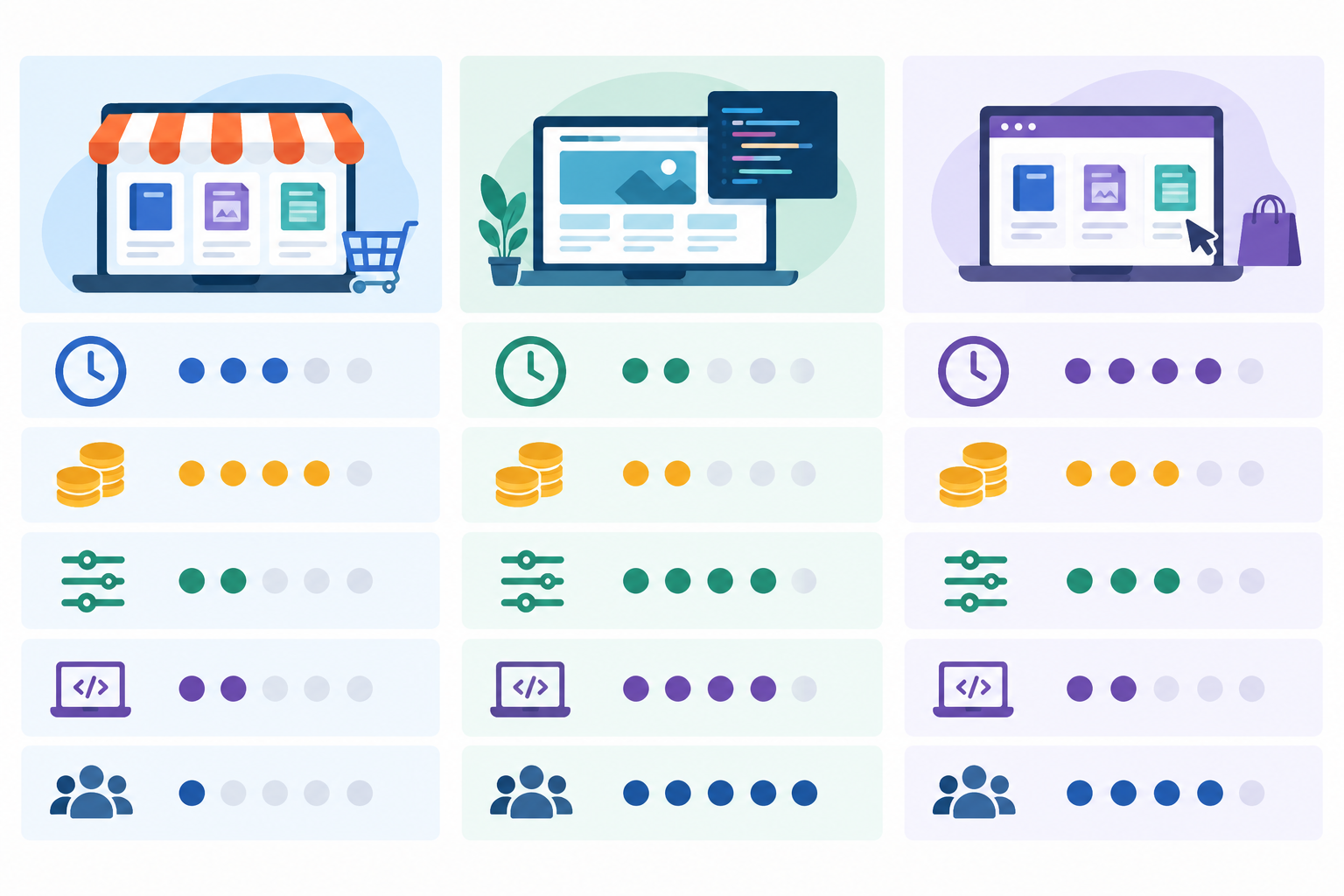
| Marketplace (e.g. Etsy) | Custom-built website | Online store builder / ecommerce platform | |
|---|---|---|---|
| Setup time | Quick | Slow | Quick |
| Traffic | Built-in, but crowded | You bring it | You bring it |
| Fees | Listing and transaction fees | Hosting, plugins, payment fees | Platform plan and payment fees |
| Brand control | Low | Total | Good |
| Technical skill | Low | High | Low |
| Customer data | Often limited by platform rules | Usually full (you're responsible under POPIA) | Usually good; check each platform's terms |
Marketplaces put your downloads in front of people already searching, which is a real advantage. The trade-off is competition, fees and rules you don't control. Some sellers use a marketplace to test demand, then add their own store once they know what sells.
A full website build gives you total flexibility, but you're suddenly dealing with hosting, plugins and security updates. Great if that's your thing. A headache if it isn't.
An online store builder or ecommerce platform is the middle ground. You control the branding and the customer relationship, without writing code.
A note on Shopstar (and a disclosure)
I work on Shopstar, so I'm biased. It's a South African platform that gives you a link-in-bio page and store in one, with a single checkout for digital downloads (and memberships, bookings, event tickets or physical products later if you need them). Payments are built in with Shopstar Go, so there's no separate payment gateway account to open. Buyers pay by card, Apple Pay on compatible devices or Scan to Pay, and payouts go to your South African bank account automatically every day. The Start Free plan has no monthly fee and charges 6% all-in per sale; the Lower Fees plan has a monthly fee and 2.9% per sale. Treat it as one example of this type of tool, and compare it with others before you commit.
Whichever platform you consider, run through this checklist:
- Payouts in rand to your South African bank account, and how often they arrive
- Automatic delivery after payment
- Secure download links (not a public file address)
- A smooth mobile checkout with payment options your buyers already use
- Clear fees, including payment processing
- Real support when something goes wrong
- File size and format limits that suit your product
Setting Up Secure, Automatic Delivery for Digital Downloads
This is the part that makes digital downloads feel a bit like magic: you set it up once, and every order after that delivers itself. The exact screens differ by platform, but the flow looks like this:
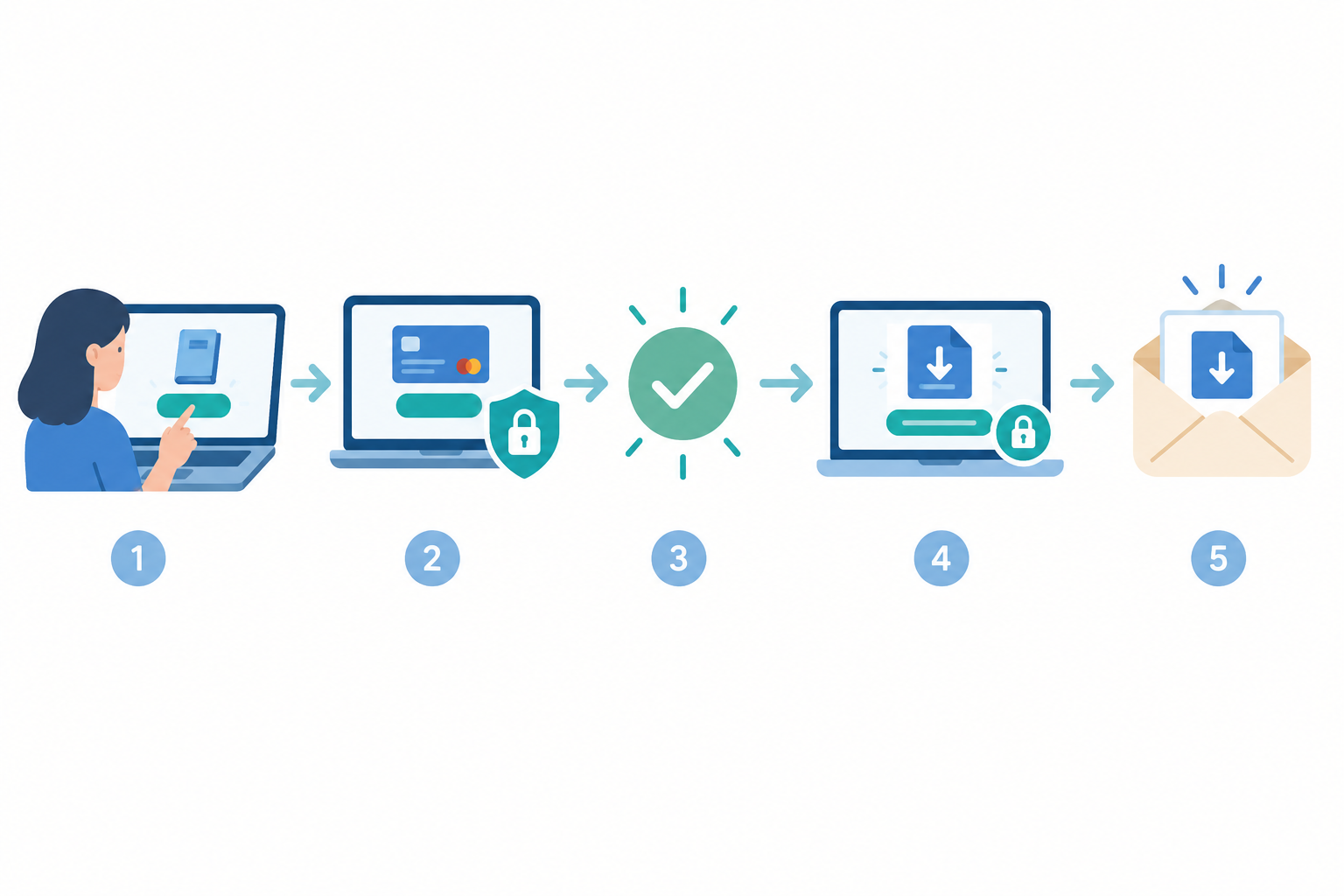
- Create your account and claim your store page (on Shopstar, that's a shopstar.page address), or connect your own domain.
- Add a new product and choose digital download as the product type.
- Upload your file(s), then write a clear title and a benefit-led description, and add preview images.
- Set your price in rand and make sure payments are switched on so you can actually get paid.
- Run a test purchase. Buy your own product and confirm the file arrives and opens properly. Don't skip this one.
How do customers receive their files instantly?
Once payment is confirmed, the customer typically sees a download link on the confirmation page and gets one by email straight afterwards. The file goes out the moment they pay, and you don't send anything manually. The email also gives buyers somewhere to look if they close the tab, which cuts down on 'I can't find my file' messages.
Can you limit how many times a file is downloaded?
Often, yes. Good delivery systems keep your original file in private storage and hand the buyer a link tied to their order. Some platforms let you set download limits (say, five attempts) or expiring links, so a shared link stops working after a while. Shorter expiry windows reduce risk, because anyone holding a valid link can use it until it expires.
The controls depend on the platform, though, so check the delivery settings rather than assuming. A quick sanity check: does it use HTTPS throughout, do files sit behind private links, and what happens when a link expires?
Discouraging sharing in practice
You can't stop every bit of sharing, and most buyers are honest. A few sensible layers help:
- Licensing terms that spell out personal versus commercial use
- Watermarks on previews and, where it makes sense, on the product
- Personalised PDFs with the buyer's name in the footer
- Strong account security for your own store, including two-factor authentication where available
Writing a Product Page That Converts
Your product page is your salesperson, so make it work hard.
- Lead with the outcome. 'Plan your month in 20 minutes' beats 'Monthly planner template'.
- Show it off. Mockups, page previews and a short walkthrough video let people see what they're buying.
- Spell out what's included. List the files, formats and any software needed.
- Add social proof. Testimonials and review snippets help, once you have some.
- Include a clear FAQ and refund policy. Consumer rights for digital content, including cancellation rules, can differ from physical goods and depend on the transaction. The Electronic Communications and Transactions Act (ECTA) gives online buyers a 7-day cooling-off right in many cases, with exclusions (unsealed audio, video or software among them), and the Consumer Protection Act (CPA) adds further protections. Check how the rules apply to what you sell before you write your policy, and consider a legal check.
- Use one strong call to action. One button, one clear next step.
Promoting Your Digital Product Page 📣
A great product with no audience is a very quiet shop. You don't need to do everything at once. Start with the one channel where you already have an engaged audience, whether that's Instagram, TikTok, Facebook, WhatsApp, LinkedIn, YouTube or an email list, and add others later.
- Make your link in bio the central hub. Point your social profiles and WhatsApp status to one page so people always land in the right place.
- Give a taste. Carousels, short videos and free samples show the value without giving everything away.
- Build an email list. Offer a free resource that leads naturally into the paid product, and ask for clear consent when people sign up, since POPIA governs how you use their details.
- Cover the SEO basics. Blog posts or pinned content that answer the questions your product solves keep bringing in visitors long after you post them.
- Collaborate. Partnerships, affiliates and swaps with creators in your niche can reach new audiences quickly.
- Plan the launch. Tease, launch, follow up, then re-promote evergreen products regularly. Payday, January back-to-school and Black Friday make natural hooks.
- Track what works. Note which channel actually drives sales, then do more of that.
Keeping Customers Happy After the Sale
The sale isn't the finish line. A friendly follow-up email a day or two later, with tips on using the product and a gentle request for a review, goes a long way. Reviews feed your social proof, and social proof feeds more sales.
Handle support questions quickly. Most are simple, like a lost link or trouble opening a file, and a fast, kind reply can turn a frustrated buyer into a fan. Update your products over time, offer loyal customers discounted upgrades, and use your order data to spot bestsellers, because they show you what to make next.
FAQ: Selling Digital Downloads
Do I need a full website to sell digital downloads?
No. An online store builder or link-in-bio page lets you upload files, set a price and take payment without building or hosting a website.
How do customers receive their files instantly?
After checkout, buyers are typically taken to a download page and emailed a link, so there's no manual sending.
Can I limit how many times a file is downloaded?
Many platforms offer download limits or expiring links, but not all do. Check your platform's delivery settings, and back them up with licence terms and watermarks.
What file formats work best for templates and ebooks?
PDF is the safest choice for ebooks and printables. For editable templates, use a PDF with an access link (Canva, Notion, Google Sheets) or a native file such as XLSX, and always state software requirements.
Do I need to charge VAT on digital downloads in South Africa?
Only once you're registered as a VAT vendor. From 1 April 2026, registration is compulsory when your taxable supplies pass R2.3 million in 12 months, and voluntary registration is possible from R120,000. Registered vendors charge VAT at 15%. See SARS's VAT registration guidance and speak to an accountant.
Ready to Sell Digital Downloads?
You don't need a huge audience or a technical background to sell digital downloads. Do first: pick one useful product, tidy the files and test them on a second device. It can wait: bundles, tiers, extra channels and memberships. Start with something you've already made, check your platform's fees and payout timing and what you owe SARS, run a test purchase, and build from there. 🚀
Related Articles
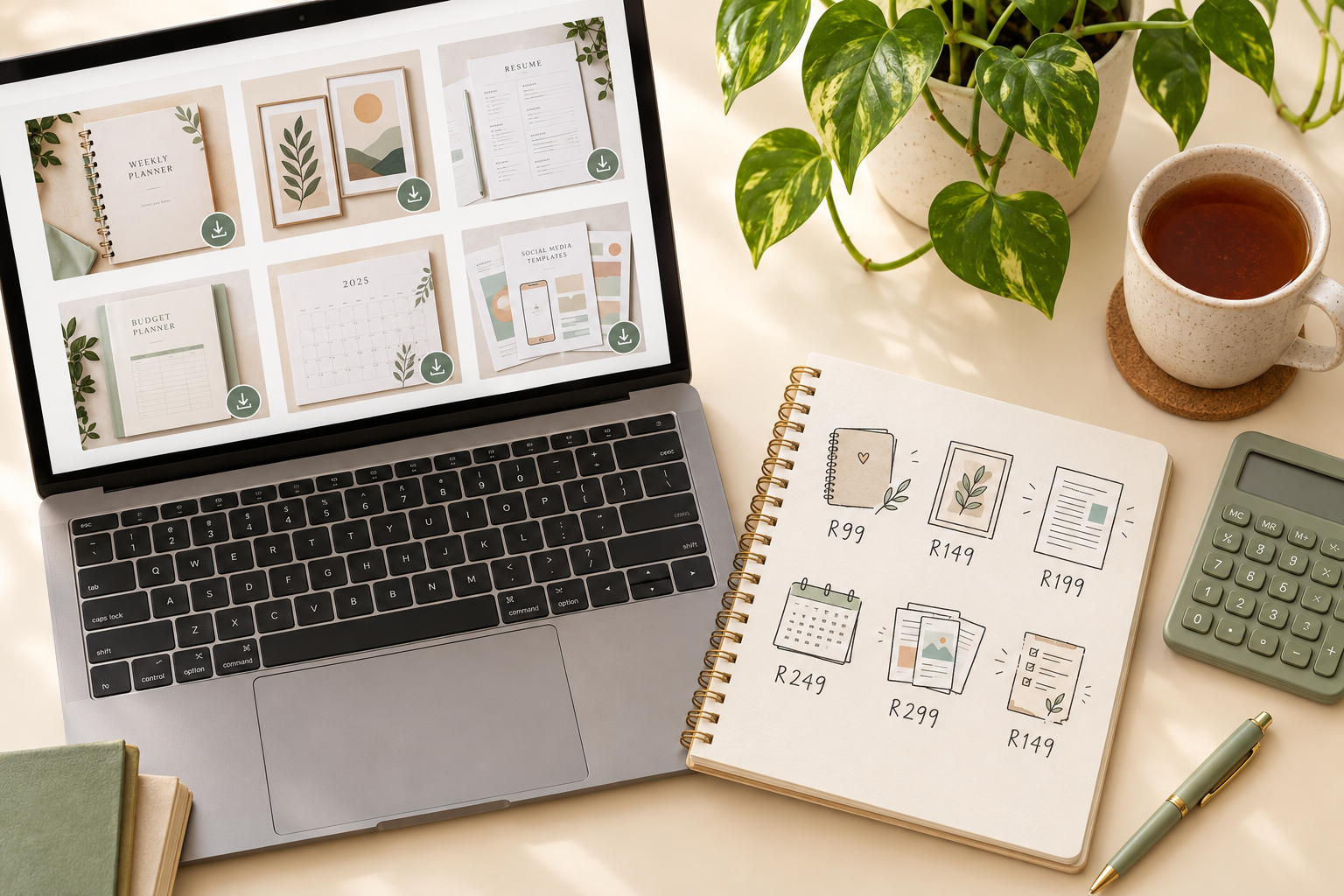
How to Price Your Digital Downloads for Maximum Sales
Learn how to price digital downloads in rand, with practical South African examples, competitor research, pricing psychology, bundles and simple tests to find a price that works.
Link in Bio vs Full Website: Which Fits Your Business?
Not sure whether a link-in-bio store or a full website suits your South African business? Compare setup time, rand costs, credibility and room to grow to find the right fit for where you are now.

Create content like this automatically
Scribe uses AI to generate high-quality blog posts that engage your audience and drive traffic.